User documentation¶
Scheduling and data transfer protocols¶
The Perfect Streamer program is designed to transmit MPEG-TS streams over the public Internet with packet loss and delays based on UDP.
For each MPEG-TS stream (Stream) a transmitter server (Sender) and one or more receivers (Receiver) are configured; this pairing is hereafter referred to as Peer.
Configuring the transmitter and receiver comes down to entering a list of streams (Stream) and settings for each Stream of the list input and output. Multiple inputs in the list provide redundancy for sources. Multiple outputs in the list allow streams to be sent to different destinations at once.
For the transmitter, input denotes the sources of MPEG-TS streams and output denotes stream delivery to receivers. For receivers, input denotes the reception of streams from transmitters.
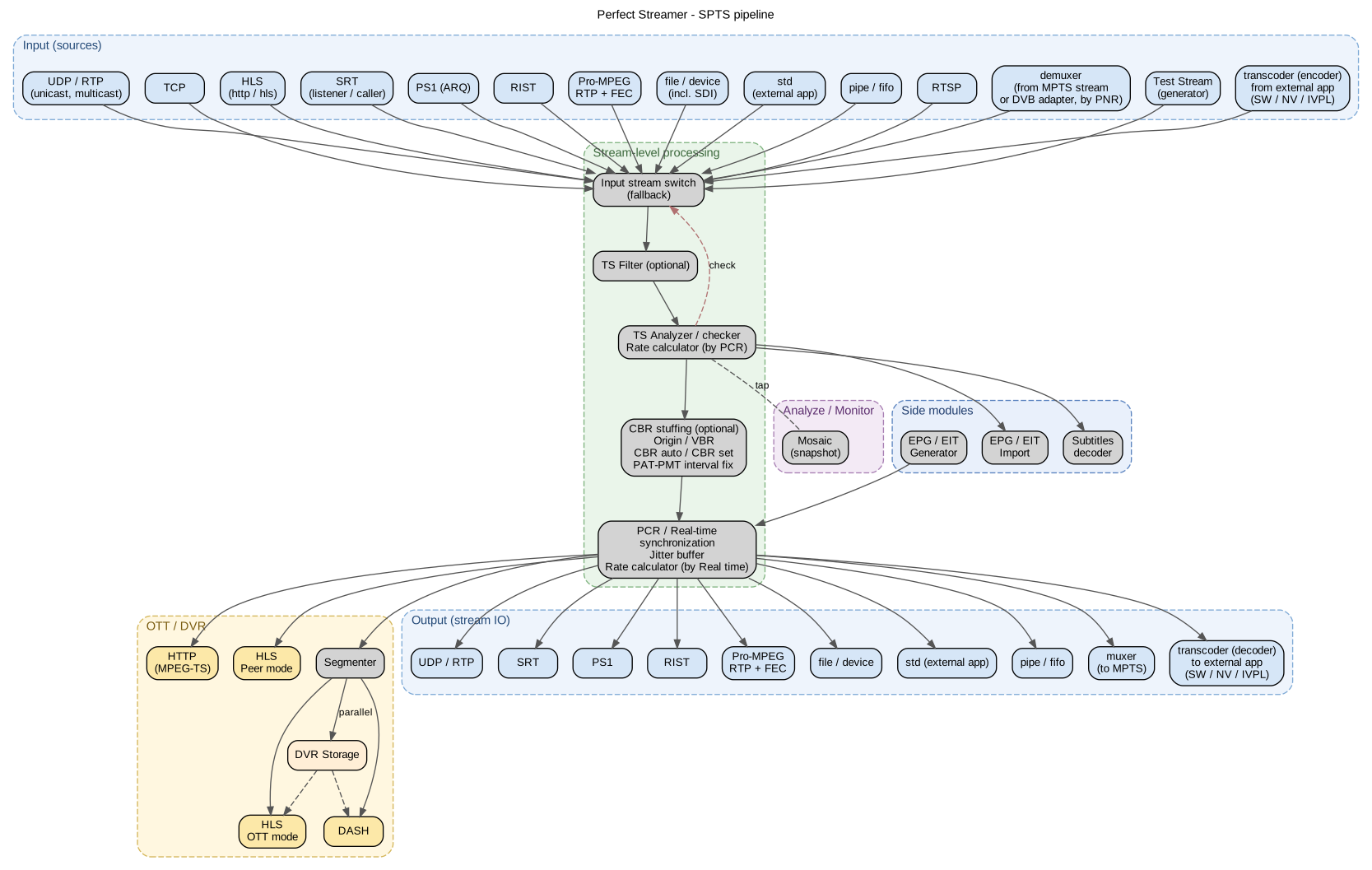
Overall SPTS stream architecture: inputs, stream-level processing (input switch, TS filter, analyzer, synchronizer), OTT / DVR and outputs. Details on each block are given in the sections below.¶
Four Peer protocols are available for transporting streams between sender and receiver:
Perfect Stream Protocol (PS1).
SRT.
Pro-MPEG / RTP+FEC.
RIST.
PS1 protocol¶
The PS1 protocol works on the principle of Automatic Repeat reQuest (ARQ). It has a low resource consumption and allows you to transmit streams with a high bit rate.
On transmitter — configurable in output. Only one copy is available for one stream. It is required to register logins for receivers in Peer. UDP listen port is set, must be unique for each stream.
At the receiver — configurable in input. The host and port of the transmitter are indicated, as well as the login and password.
Encryption of streams is available (Crypto protection), AES-128 is used. To enable encryption on both sides, enter Crypt Passphrase — a shared key.
During operation, the receiver (client) transmits its statistics data to the transmitter (server). This can be viewed in the Peers section by selecting a client from the list.
Stream latency and the ability to correct losses depends on the receiver (client) settings:
Round Trip Time — RTT, ms, default 300. Estimated delay (ping) in the channel. After starting the stream, the real RTT can be seen in the statistics (PS1 recovery delay).
Client Latency (RTT multiplexor) — multiplier to RTT, by default 10, which determines the stream delay on the sender’s buffer. Those. the default buffer delay is 3000 ms.
From the sender’s side there is a delay setting (buffer length) — Latency (ms). It should be greater than the delays specified by clients.
The ability of a protocol to compensate for losses is determined by the number of retransmission requests and depends on Client Latency (RTT multiplexor). Large losses lead to additional network traffic. To reduce latency, you should fine tune these parameters.
See client statistics to check the correct operation of the protocol. Counters PS1 recovery — if Not found, increase the sender’s buffer; Duplicates — increase RTT.
When switching the stream input (changing the source) on the transmitter, the send queue may briefly grow. PS1 handles this smoothly: the oldest packets are silently dropped, while the numbering (seqID) and timestamps at the receivers remain continuous — the receivers recover the losses through the regular retransmission mechanism (retr), without reinitializing the connection. The number of packets dropped this way is visible in the extended statistics of the PS1 output.
Since the connection is initiated from the side of the receiver, the transmitter requires authentication, the receivers are registered in the peers section. Login and password required. Authorization by server IP is possible, for this specify only the IP of the receiver in peer settings.
SRT protocol¶
SRT is an open protocol designed by Haivision. Based on the UDT protocol. It has wide distribution and good packet loss performance.
Use cases:
Peer between Perfect Streamer instances. On the transmitter — configured in the output, listen mode (default). In this mode several receivers can be connected. For authorization, logins for the receivers must be set in Peer. On the receiver — configured in the input. The host and port of the transmitter are specified, as well as login and password. To pass login and password, the SRT streamer uses streamid in the format
login|password.Peer between Perfect Streamer and any third-party SRT streamers. On the transmitter you can set up SRT client mode by switching off listen. The SRT streamid, if required, is entered in the login field. For listen mode, IP-address authorization is available — entered in the login field in Peer. On the receiver you can enable listen mode, set the SRT streamid in the login field, and also specify the host from which reception is allowed.
Work in the Listener mode: receiving and transmitting a TV channel stream with the indication of the receiving port.
Ports for listen mode must be unique.
Encryption of streams is available (Crypto protection), AES-128 is used. To enable encryption on both sides, enter Crypt Passphrase — a shared key.
If the transmitter uses the listen mode (default), then the connection is initiated by the receiver, and the transmitter requires authentication, the receivers are registered in the peers section. Login and password required.
SRT protocol options match the description — API-socket-options.md
Reorder (SRTO_LOSSMAXTTL) — The value to which the reorder tolerance can increase. Reorder tolerance is the number of packets that must follow a detected ‘gap’ in the sequence numbers of incoming packets before a loss report is sent (in the hope that the gap is caused by packet reordering rather than loss). The reorder tolerance value starts at 0 and increases when packet reordering is detected. This occurs when a ‘late’ packet is received with a sequence number higher than the last received one, but without the retransmission flag. Upon such detection, the reorder tolerance is set to the value of the interval between the last number and the sequence number of that packet, but not more than the value set by the SRTO_LOSSMAXTTL parameter. By default, this value is 0, which means that this mechanism is disabled. SRTO_LOSSMAXTTL
Overhead (SRTO_OHEADBW, %) — Overhead for bandwidth recovery beyond the input rate (see SRTO_INPUTBW), as a percentage of the input rate. Effective only if SRTO_MAXBW is set to 0. Sender: user-configurable, default: 25%.
Recommendations: Overhead is intended to provide additional bandwidth capacity in case a packet has taken up some bandwidth but is then lost and needs to be retransmitted. Therefore, the effective maximum bandwidth should be sufficiently higher than the bitrate of your stream to leave room for retransmissions, while being limited so that retransmitted packets do not lead to a sharp increase in bandwidth usage when large groups of packets are lost. Do not set too low a value and avoid 0 if the SRTO_INPUTBW parameter is set to 0 (automatic). Otherwise, your stream will quickly interrupt with any increase in packet loss. SRTO_OHEADBW
Max Band (SRTO_MAXBW, bps) — This option is effective only when SRTO_MAXBW is set to 0 (relative). It controls the maximum bandwidth together with the SRTO_OHEADBW parameter according to the formula: MAXBW = INPUTBW * (100 + OHEADBW) / 100. If this option is set to 0 (automatic), the actual INPUTBW value will be estimated based on the input stream (cases where the application calls the srt_send* function) during transmission. The minimum allowable estimate value is limited by the SRTO_MININPUTBW parameter, i.e. INPUTBW = MAX(INPUTBW_ESTIMATE; MININPUTBW).
Recommendations: Set this parameter to the expected bitrate of your broadcast and leave the default value of 25% for SRTO_OHEADBW. SRTO_INPUTBW
Timeout (SRTO_CONNTIMEO, ms) — Value of the connection timeout in milliseconds. This is the time during which the connecting object will try to connect and wait for a response from the remote endpoint, before terminating the connection with an error code. SRTO_CONNTIMEO
Pro-MPEG / RTP+FEC Protocol (COP3 / SMPTE 2022-1/2)¶
Delivery of MPEG-TS over RTP with forward error correction (FEC, Forward Error Correction). The same protocol appears in literature and equipment under different names:
Pro-MPEG / Pro-MPEG COP3 — Code of Practice #3 of the Pro-MPEG forum, described in the IEEE standard (https://ieeexplore.ieee.org/document/6738329);
RTP + FEC — functional name (RTP stream plus FEC channels);
SMPTE 2022-1 — Column FEC (same scheme, published as an SMPTE standard);
SMPTE 2022-2 — Row + Column FEC (two-dimensional matrix, implemented in PSS).
Advantage — low latency. Its disadvantage is high additional traffic (overhead), and it works poorly with large packet losses (more than 0.2%).
This protocol is based on RTP with the addition of two channels for FEC (Error Correction Code). The two FEC channels use ports port+2 and port+4, which must be taken into account when adding multiple streams on one host or multicast group.
At the sender, the stream of RTP packets is grouped into a matrix with Cols columns and Rows rows. Example for cols=8 and rows=4 (default):
RTP01 |
RTP02 |
RTP03 |
RTP04 |
RTP05 |
RTP06 |
RTP07 |
RTP08 |
R1 |
RTP11 |
RTP12 |
RTP13 |
RTP14 |
RTP15 |
RTP16 |
RTP17 |
RTP18 |
R2 |
RTP21 |
RTP22 |
RTP23 |
RTP24 |
RTP25 |
RTP26 |
RTP27 |
RTP28 |
R3 |
RTP31 |
RTP32 |
RTP33 |
RTP34 |
RTP35 |
RTP36 |
RTP37 |
RTP38 |
R4 |
C1 |
C2 |
C3 |
C4 |
C5 |
C6 |
C7 |
C8 |
Rx and Cx packets form data for FEC in rows and columns. The smaller the matrix size, the better the loss correction ability, but the more additional traffic. In this example, there are 12 FEC packets for 32 RTP packets of the stream.
Stream encryption (Crypto protection) is available using AES-128, but this is not included in the standard, so compatibility with third-party software or hardware is not guaranteed.
There are non-standard protocol extensions:
Multiplexing — multiplexing of RTP channels over a single UDP port. May simplify network configuration.
RIST protocol¶
It is new open protocol. It is based on RTP/RTCP. It works as Automatic Repeat reQuest (ARQ) without ACK, only NACK, which provides high efficiency.
It uses unicast and multicast
Simple and Main profiles are implemented. Simple uses 2 udp ports in a row, the specified port must be even. Main uses only one RTP port with data multiplexing.
On transmitter — configured in output. For unicast, the receiver address and port are configured. For multicast, you need to set the network interface through which the data will be transmitted. Also for multicast you can set up receiver authorization by IP address by registering logins in Peer.
On receiver — endpoint is configured as input. For unicast mode, the receiver port (listen) is configured and the network interface is required. For multicast mode, only multicast group and port are set.
RIST supports several separate peers (addresses). If you set a weight (greater than 1), a load-balancing mode across peers according to the weight is enabled.
If the transmitter uses multicast, then there can be many receivers. In this case, it is possible to authenticate receivers by IP address. To do this, enable authentication in the transmitter settings (disabled by default) and add the client to the Peer list, enter the IP address in the login field.
Other protocols¶
In addition to peer protocols for receiving and transmitting streams, others are available:
Protocol |
Input |
Output |
|---|---|---|
UDP |
Yes |
Yes |
RTP |
Yes |
Yes |
TCP |
Yes |
No |
HLS |
Yes |
Yes |
RTSP |
Yes |
No |
RTMP |
Yes |
Yes |
pipe |
Yes |
Yes |
UDP (Unicast or Multicast) — reception and transmission of MPEG-TS in a UDP packet, up to 7 TS packets per UDP packet.
RTP (Unicast or Multicast) is a standard RFC-based protocol. Reordered package recovery is supported.
TCP — receiving MPEG-TS in TCP connection, TCP client mode.
HLS — ingest and delivery of MPEG-TS over HTTP, or the standard Apple HLS protocol. On ingest, the highest-bitrate rendition of an adaptive playlist is selected. HLS input is available for SPTS streams only; for MPTS use UDP / RTP / TCP / file or a DVB adapter.
RTSP — ingest of video from RTSP sources (IP cameras, RTSP servers) based on FFmpeg avformat. PSS opens an RTSP session (DESCRIBE → SETUP → PLAY), reads the ES packets, remuxes them into an internal MPEG-TS and feeds the stream pipeline. The Annex B BSF (h264_mp4toannexb / hevc_mp4toannexb) is engaged automatically. If the source has no audio tracks, a silent MPEG-1 Layer 2 track (48 kHz, stereo, 128 kbps) with PTS slaved to video is added — this is required for compatibility with the stream pipeline, which expects at least one audio track.
RTSP input settings:
URI — the full URL of the RTSP session, e.g.
rtsp://cam.local/play1.sdp.Login, Password — RTSP credentials, if basic / digest authentication is required.
User-Agent — custom User-Agent (optional).
Cookies —
Cookieheader (optional, for servers using cookie-based authentication).Transport — RTP transport within RTSP:
UDP— RTP over UDP (low latency, sensitive to packet loss);TCP(default) — RTP interleaved within the RTSP TCP session; traverses NAT and firewalls;HTTP— RTSP-over-HTTP tunnel, for traversal through HTTP-only proxies.
Timeout — open and read timeout in seconds. Default is 10.
Trace — verbose log for diagnostics.
RTSP-input runs in a single process with PSS and does not require an external binary. For protocols not covered by the built-in tools, the workaround via std + an external application (ffmpeg, gstreamer) remains available.
The RTSP input is a single-program source and is therefore available for SPTS streams only.
pipe — read from and write to an existing named pipe (FIFO). Unlike std, PSS does not spawn a child process — the external producer / consumer must be started independently and keep the pipe open on its side. In the settings, File Path specifies the path to an already existing FIFO (created, for example, by the mkfifo command). PSS opens the FIFO in read mode (for input) or write mode (for output). Available for SPTS and MPTS.
RTMP / RTMPS protocol¶
RTMP (Real-Time Messaging Protocol) is available in Perfect Streamer both for reception (input) and transmission (output), based on FFmpeg avformat. Typical scenarios are publishing a TV channel to external platforms (YouTube, Facebook and any RTMP receivers) and receiving a stream from an RTMP server. The secure variant RTMPS (RTMP over TLS) is supported for both directions; in this case Perfect Streamer acts as a TLS client.
RTMP is a single-program protocol, so RTMP input and output are available only for SPTS streams.
RTMP input (reception)
Perfect Streamer connects as an RTMP client to the specified rtmp:// or rtmps:// source and pulls the stream (pull mode). The received elementary streams (video H.264 or HEVC, audio AAC) are remultiplexed into the built-in MPEG-TS and fed into the stream pipeline. There is no mode for waiting on an incoming publication (listen / push) — reception is always initiated by Perfect Streamer itself.
RTMP input settings:
URL — the full address of the RTMP session, for example
rtmp://origin.example/live/streamkey. Thertmpandrtmpsschemes are allowed.Bind Interface — the local interface or IP address from which the outgoing connection is established. By default it is chosen by the operating system’s routing.
Timeout — connection and read timeout, from 1 to 120 seconds. Default is 10.
TLS Verify — for
rtmps, verify the server certificate. Disabled by default.Trace — verbose log for connection diagnostics.
RTMP output (publishing)
Perfect Streamer publishes an SPTS stream to an external RTMP receiver: it connects as an RTMP client to the platform’s publishing address and sends the stream (publish mode). RTMP is a single-program format: one video (H.264 or HEVC) and no more than one AAC audio track are published. If the source has several tracks, one video and one audio track are selected; extra and incompatible ones (for example, non-AAC audio) are not transmitted. A multi-track source can be narrowed down in advance with the PID Accept / PID Reject filters (see «Filtering and modification of MPEG-TS»).
HEVC video is published via Enhanced RTMP — enabled by the Allow HEVC option. If the receiving platform does not support HEVC, disable the option: then only H.264 is published.
Before publishing starts, the stream is analyzed. If there is no compatible video, publishing is not performed. The analysis result is available in the stream statistics: a publish-capability flag, the selected video and audio codecs, the list of dropped tracks, and the connection state.
RTMP output settings:
URL — the platform’s publishing address, for example
rtmp://a.rtmp.youtube.com/live2/<stream-key>. Thertmpandrtmpsschemes are allowed.Bind Interface — the local interface or IP address of the outgoing connection. Default — the operating system’s routing.
Timeout — connection and transmission timeout, from 1 to 120 seconds. Default is 10.
Allow HEVC — allow publishing HEVC video via Enhanced RTMP. Enabled by default; when disabled, only H.264 is transmitted.
TLS Verify — for
rtmps, verify the server certificate. Disabled by default.Trace — verbose log for publishing diagnostics.
Examples of publishing addresses:
YouTube —
rtmp://a.rtmp.youtube.com/live2/<stream-key>Facebook —
rtmps://live-api-s.facebook.com:443/rtmp/<stream-key>
Working with files and devices¶
file/device protocol is available for both input and output for working with files and devices.
output file/device — writing to a file or output to a device. File writing may be required to write to a ts-file and subsequent diagnosis by other analyzers. Output to a device - any device (including SDI) that is registered in /dev.
input file/device — cyclic playback of video from a ts-file.
- When working with files, the full path to the file is specified in the field File Path:
/catalog/stream.ts.
When working with devices, the Is Device flag is additionally activated.
Stream access list and Peer limitations¶
Peer’s stream access list allows you to configure access restrictions for clients in SRT Listen mode, PS1, HLS and HTTP modes. You can configure stream access list on Sender side in Peer settings. You only should append allowed streams to Stream Access block. It is empty by default and in this case all the streams are allowed.
Time limit and connections count limit are also available for the Peer.
Anonymous peer
By default, the peer login is anonymous. Anonymous peer allows to distribute streams without binding to IP or login and password. Restrictions on the number of streams issued by transport protocols, date restrictions and allowed streams list are applied.
It is possible to create an individual peer by login (name) and password.
To authorize peer by IP, you should enable the “Login Is IP” option.
Authorization options:
By single IP
By IP range, for example: “192.168.1.10-192.168.1.20”
Combined option, syntax of IP lists:
ip[-ip2][,...]
Connection of third-party applications¶
To support other protocols that are not supported by the built-in tools, it is possible to receive and transmit a stream through third-party console applications. There is a separate std protocol for input and output for this. The MPEG-TS stream is received and transmitted through the operating system I/O stream.
The setting specifies the console application (absolute path), command line. You can also set environment variables.
For input, when configuring an external application, it is necessary to exclude the appearance of messages in the standard output, only in stderr.
For output it is possible to set packing up to 7 MPEG-TS packets.
Input stream requirements¶
Compliant with iso13818-1, Single Program (SPTS) or Multi Program Transport Stream (MPTS). Features of MPTS are described below, further settings are indicated for Single Program.”
At least one audio track is required.
Streams without video are supported, enabled by Radio mode.
Supported encoded streams, you need to enable Scrambled Stream.
For synchronization, the stream must have valid PCR marks.
Stream settings¶
Set an unique stream name. Use latin, numbers, signs «_», «-». Also you can set stream display name, national symbols are supported.
Stream Timeout — total stream timeout. If during this time there is no valid input stream, then a complete restart is performed.
Pause — transfer stream, as well as all input and output to inactive state. By default, when adding a new stream as well as input and output they will be paused and inactive.
The program checks the input stream with input for its validity. If the stream fails, then input is considered abnormal.
Check Interval — Interval to re-check the stream.
MPEG-TS filter options:
Remove All Unnecessary Data — Deletes all unnecessary data except PAT/PMT, video and sound, except those specified in separate filters (see below)
Remove SDT — Deletes SDT data (channel name, provider, etc.).
Remove EIT/EPG — Deletes EPG data.
Remove Teletext — Deletes teletext data.
Remove Subtitles — Deletes subtitles data.
Stream bitrate management:
Bitrate mode — bitrate management mode.
Origin (default) — stream is transmitted without changes.
VBR — removes NULL packets to minimize bitrate. Enable if streams are used only for OTT broadcasting.
CBR auto — enables bitrate alignment by inserting NULL packets (Stuffing). The resulting bitrate will be set to the maximum bitrate of the input stream.
CBR set stuffing bitrate — explicitly set the desired bitrate. If you set less than the input stream, it will be aligned as in the CBR Auto mode.
When CBR mode is enabled, PCR Accuracy will correspond to TR 101 290. PCR interval will be as in the original stream.
Streams correction:
Fix PAT/PMT interval — corrects the interval to correspond to TR 101 290, inserting additional PAT/PMT.
Source reservation¶
Several inputs can be specified as a list, but only one is active. If an input fails, an attempt is made to use the next one in the list, and so on in a circle.
If stream has Fallback Check enabled, then when the backup input (not the first one in the list) is running, a recheck will be performed higher in the list with the Check Interval interval. If, when rechecking, the stream is valid, then stream switches to it.
Since the order of input matters, it can be changed. If input is paused, then it will not be taken into account when working.
Filtering and modifying MPEG-TS¶
By default, the MPEG-TS stream is transmitted as is.
For each input the following MPEG-TS stream filtering options are available:
PID Accept — list of allowed pids. If empty, allow all except PID Reject.
PID Reject — list of prohibited pids. Takes precedence over PID Accept.
It is possible to change the PID. For this, the PID Old and PID New lists are filled in.
Mapping PID and Languages — remap of audio track languages.
Default Language — assign the default language if there is no language for the sound track.
For stream you can assign new MPEG-TS data (SDT table):
MPEG-TS Network ID
Service Name
Provider Name
Language
MPTS streams¶
MPTS stream — an MPEG-TS stream carrying multiple services, each identified by a unique program number (PNR). Used for DVB broadcasting.
Filtering options are not available for MPTS streams. Streams are passed as is.
RTSP cannot be a source of an MPTS stream — it is a single-program protocol, applicable only as an SPTS source.
The mosaic feature is disabled by default. It is not recommended to enable it on weak CPUs, it can add jitter.
Stream diagnostics displays data for all programs separately, as well as summary statistics.
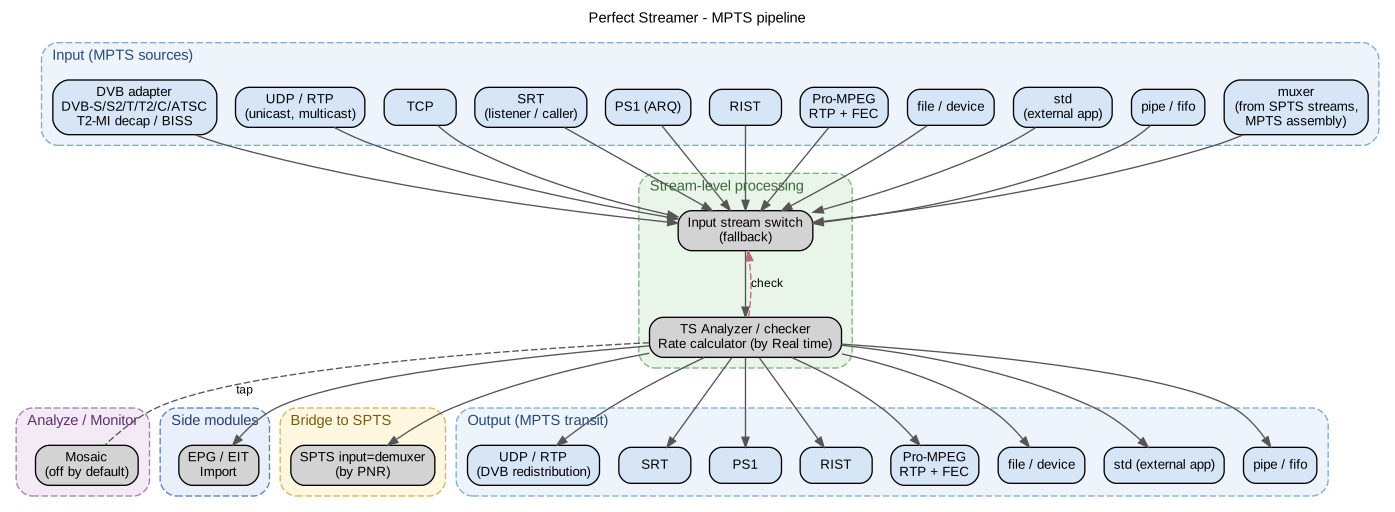
MPTS stream architecture: pass-through without per-service filtering; for per-service processing (OTT, DVR, filtering) use the demultiplexer input of an SPTS stream.¶
Demultiplexor¶
Extracts individual streams from an MPTS stream. To do so, add an input of type demux in the SPTS stream, select the source and the service by PNR. If the source MPTS is active, a list will be available when picking the PNR; otherwise the PNR must be entered manually.
Multiplexor¶
Assembles MTPS stream from separate SPTS streams. To confgure:
Create MPTS stream.
Add an input of type muxer. Set the bitrate to align the CBR stream (stuffing, TR 101 290 and T-STD compliance). If you set 0 (default) then alignment will not be performed, bitrate will correspond to the input streams. There you can also enter some parameters of MPEG-TS stream, for most applications the default parameters will be suitable.
Add output of muxer type into source stream. Set up service name and provider name if needed. Select language in MPEG-TS settings if you use non-latin alphabet.
Repeat for all sources.
Multiplexor generates SDT, NIT and TDT/TOT (time marks) for stream. EIT (EPG) is taken from source streams. New PIDs are assigned.
Test streams¶
Test Stream generator — a test signal (test card). Lets you build generated video streams as fillers for the air or fall-backs during failures of the main streams. The picture type, audio and overlaid text and time can all be configured.
It is configured by enabling the corresponding type of input for the stream. It is possible to set video format type, resolution, bitrate, sound volume and frequency, etc.
A list of available Test Streams is available in the left side menu of the program.
OTT service¶
Delivers streams over HTTP-based protocols — HLS (over MPEG-TS), MPEG-DASH and Low-Latency HLS (over CMAF — fragmented MP4, since version 1.13), as well as MPEG-TS over HTTP. HTTPS (SSL) and HTTP/3 (QUIC) are supported. Delivery is enabled on the OTT tab of the Stream settings.
URLs for connections have format:
http://host:port/http/stream/login/password — login/password authorization
http://host:port/http/stream/login — login authorization (token)
http://host:port/http/stream/ — IP authorization
host and port — set in http server settings.
stream — stream ID. Not to be confused with the sequence number in streams list. ID is shown in stream stats page header and in streams list ID column, ID is set at stream creation and never changes.
Likewise for HLS, DASH and Low-Latency HLS (the last two — only in OTT/HLS/LL-HLS/LL-Dash, see below):
On the stream statistics page, the URLs of the connected protocols (as a template) and their current working status are displayed. Unauthorized access is denied; clients must be registered in Peers.
Additional parameters are available in the URL for HLS and DASH (optional):
[URL]?a=1&s=40&m=40&v=5&h3=1
a: 1 — absolute path in the playlist, 0 — relative path (default).
s - dynamic play list duration (sec), default 40 sec.
m: minimum dynamic-playlist duration (sec), 40 sec by default. The maximum dynamic-playlist size is 60 sec. If the current chunk-buffer size is less than the minimum size requested, an HTTP 404 is returned. This is done so that HLS starts with a filled chunk buffer on the server.
v: the HLS protocol version emitted in the playlist. By default the value depends on the HLS mode (see below): OTT/HLS and OTT/HLS/LL-HLS/LL-Dash — 6, Peering/HLS — 3. An explicit value in the URL overrides the default. Changing the version may be needed for compatibility with a specific HLS client.
h3: opt-in to HTTP/3 (QUIC) for this OTT session. Causes the server to emit an
Alt-Svcheader in the response, after which a compatible player / browser switches to QUIC. See section HTTP/3 (QUIC) below.
File name index.m3u8 could be added to URL for some players support, for example: http://host:port/hls/stream/login/password/index.m3u8.
The delivery mode is set by the stream setting OTT HLS (the OTT tab): Peering/HLS, OTT/HLS or OTT/HLS/LL-HLS/LL-Dash.
Peering/HLS — a mode with simple segment (chunk) splitting. Recommended for peering (distribution) of streams. Only HLS over MPEG-TS (/hls) is delivered. By default the playlist is served as EXT-X-VERSION:3 for compatibility with peer clients.
OTT/HLS — a mode with segment splitting optimized for fast player start-up in OTT broadcasting. In this mode the CPU load is higher; it is recommended for broadcasting. HLS over MPEG-TS (/hls) is delivered. By default the playlist is served as EXT-X-VERSION:6 with EXT-X-INDEPENDENT-SEGMENTS and the CHARACTERISTICS attribute in EXT-X-MEDIA TYPE=SUBTITLES (Apple HLS, hls.js, Safari, dash.js/Shaka). If a specific client needs an earlier value, set it via the ?v= query parameter (see the list of parameters above).
OTT/HLS/LL-HLS/LL-Dash — a delivery mode over CMAF (fragmented MP4, fMP4; since version 1.13). The stream produces fMP4 segments (.m4s + a shared init.mp4, mimeType="video/mp4"), on top of which the following are delivered:
MPEG-DASH on
/dash— now over CMAF, and not over MPEG-TS;Low-Latency HLS on
/llhls(see Low-Latency HLS below);with the stream setting Enable TS Chunk turned on (default true) — additionally legacy HLS over MPEG-TS (
/hls), as in OTT/HLS; with false, only fMP4 segments are delivered, which saves disk and CPU.
The HLS playlist in OTT/HLS/LL-HLS/LL-Dash defaults to EXT-X-VERSION:6 as well.
Note
MPEG-DASH and Low-Latency HLS are available only in OTT/HLS/LL-HLS/LL-Dash. In OTT/HLS and Peering/HLS, only HLS over MPEG-TS is delivered.
SSL (HTTPS) can be enabled for HTTP server, this is done in the server settings.
Chunk Min Interval and Chunk Max Interval
In OTT mode the stream is analysed for PAT/PMT/SPS/PPS/IFrame and chunks are sliced according to the fast-start criterion for players. The analysis starts from min interval, and if for any reason the data is not found, the chunk is forcibly sliced at max interval.
GOP-aligned segments
In OTT/HLS the segmenter aligns chunk boundaries to random access points and distinguishes between IDR and an ordinary I-frame. If the source broadcasts with closed-GOP (IDR present), each .ts TS segment is guaranteed to start with SPS / PPS / IDR (for HEVC — also VPS) — a true entry point from which the player opens the stream. If the source is open-GOP / without IDR, the boundary is the nearest I-frame (the former behaviour). The segmenter cuts off the “tail” of the previous GOP — the P / B slices — from the window between the leading PAT and the chunk’s first SPS. This:
eliminates the initial black frame at VOD session start (
?t=/?epg=) in hls.js, Safari and VLC: the MSE decoder receives the correct header set of NAL units already in the first segment and starts immediately;brings the output into compliance with HLS RFC 8216 §3 (“Each Media Segment MUST contain a SPS and a PPS that decode its first Access Unit”);
makes the EXT-X-INDEPENDENT-SEGMENTS declaration in an EXT-X-VERSION:6 playlist accurate.
Controlled by the per-stream gop-aligned-segment setting (default true). Applies only when HLS = OTT/HLS: in Peering/HLS and for MPTS streams the behaviour is unchanged. PSI (PAT / PMT) and audio are preserved in full; the only side effect is a one-frame continuity_counter break on the video PID at the boundary between two adjacent chunks, which is a legitimate decode boundary for HLS / DASH MSE.
When aligning to entry points, the actual chunk duration may round up beyond Chunk Min Interval. Therefore, in the live playlist the EXT-X-TARGETDURATION value reflects the maximum actual segment duration (section 4.3.3.1 of RFC 8216) rather than the configured minimum. This keeps the manifest within the standard: hls.js and compatible players do not shorten the playlist refresh interval and do not raise spurious bufferStalledError.
Low-Latency HLS (/llhls)
In OTT/HLS/LL-HLS/LL-Dash, in addition to /dash a separate Low-Latency HLS endpoint is available — low-latency delivery on the same CMAF fMP4 segments:
The media playlist is split into partial segments (parts, #EXT-X-PART directives): the player starts playback without waiting for the full segment to be ready. Blocking playlist reload (the server holds the request until the next part is ready) and the #EXT-X-PRELOAD-HINT preload hint are used.
The target duration of a part is set by the stream setting Part Target Duration (ms; default 500, range 100–5000). The value is applied on the fly, without restarting the stream, and must be less than Chunk Min Interval.
HLS / DASH / LL-HLS Adaptive Multistream
HLS Adaptive Multistream is supported since version 1.10, DASH Adaptive Multistream since version 1.12 (since version 1.13 — over CMAF), and Low-Latency HLS Adaptive since version 1.13.
A separate playlist is configured for adaptive streams. To do this:
Enable OTT delivery on the streams that will be part of the adaptive playlist: OTT/HLS — for adaptive HLS over MPEG-TS; OTT/HLS/LL-HLS/LL-Dash — for adaptive DASH / Low-Latency HLS over CMAF.
An adaptive-streams section will appear in the main menu. There you need to add a stream and list all the streams that should be included in this playlist.
Streams may have a bitrate parameter set. By default it is 0 — the bitrate is taken from the measured value; otherwise it can be set explicitly.
Adaptive stream URL is differ:
Peers (clients) can have an access restriction to adaptive streams, just as to ordinary ones. Permission for an adaptive stream includes permission for all streams that are included in it.
HTTP/3 (QUIC)¶
Since version 1.13.1.438, Perfect Streamer includes a built-in HTTP/3 server for OTT delivery of HLS, MPEG-DASH and Low-Latency HLS over QUIC (RFC 9000 + RFC 9114). The stack is ngtcp2 (QUIC v1) + nghttp3 (HTTP/3 frame layer); the TLS infrastructure reuses the same certificate as the HTTPS listener.
QUIC serves OTT routes only:
/— root redirect,/hls/...,/dash/...and/llhls/...— master playlists / MPD,/h<sessID>/...— per-session URL (media playlists, segments, VTT),/http/<stream>/...— raw MPEG-TS over HTTP.
Low-Latency HLS and DASH are delivered over QUIC incrementally (chunked): parts are sent to the client as they become ready, without waiting for the full segment.
Administrative paths (/data, /config, /xmltv, /db/, /login, /logout, /restart) return 404 over QUIC — the admin API stays on HTTPS / HTTP-TCP. This is a deliberate restriction that reduces the attack surface of the QUIC listener.
Enabling¶
The QUIC settings reside in the Configuration / HTTP server section (node /config/http-server):
HTTP/3 Enable (
http3-enable) — global flag that enables the QUIC listener. Default is off. Enabling opens a UDP socket onhttp3-port; disabling closes it.HTTP/3 Port (
http3-port) — UDP port of the QUIC listener. Default is 43984. QUIC runs on UDP and HTTPS on TCP; the ports may coincide or differ — there is no conflict between them.HTTP/3 0-RTT Enable (
http3-zero-rtt-enable) — allows the 0-RTT handshake (RFC 9001 §4.6.1) on resumed connections from the same client. Reduces start-up latency; the replay risk must be considered for non-idempotent requests (it is safe for read-only OTT workloads). Default is on.
Configuration changes are applied hot, without restarting the service.
The certificate and key are taken from the HTTPS listener — there is no separate certificate setting for HTTP/3. If HTTPS is not configured (ssl-enable=false), enabling HTTP/3 yields nothing — the handshake will not complete.
The ?h3 parameter — per-session opt-in¶
A browser does not connect to an HTTP/3 endpoint directly — it first reaches HTTPS/TCP, receives the Alt-Svc: h3=":<port>"; ma=86400 header in the response (RFC 7838), and only subsequent requests to that origin are switched to QUIC.
In Perfect Streamer, Alt-Svc emission is opt-in per OTT session. The server does not advertise QUIC to every client indiscriminately: the client must explicitly request HTTP/3 via the ?h3 query parameter on the master HLS / DASH URL.
Value in URL |
Opt-in value |
|
|---|---|---|
parameter absent |
off (default) |
no |
|
on |
yes |
|
on |
yes |
|
explicit off |
no (as when absent) |
Once the client has obtained the session URL /h<sess>/..., the wantH3 flag is stored in the session — all subsequent media-playlist refreshes, segment GETs and VTT-chunk GETs under that session URL also receive Alt-Svc, even if ?h3 is absent from the individual request. Without opt-in on the master, no sticky behaviour is established.
Alt-Svc gating:
The QUIC listener is globally enabled (
http3-enable=true); otherwise the advertisement is suppressed even when?h3is set.The request did not arrive over QUIC — on requests already served over H3,
Alt-Svcis meaningless and is not emitted.Per-session or per-URL
wantH3=true(see the table above).The admin and EPG servers never emit
Alt-Svc— they have no QUIC listener.
This behaviour is consistent with RFC 7838 §3 — the server itself decides on which responses to emit Alt-Svc.
QUIC switch-over scenario in the browser¶
Typical flow (Chrome / Firefox / Safari):
The player opens the master URL with explicit opt-in:
https://stream.example.com:41982/hls/test1/login/password/index.m3u8?h3=1
The first request goes over HTTPS/TCP. In the response the server emits
Alt-Svc: h3=":43984"; ma=86400.The browser caches the mapping
stream.example.com:41982 → h3=":43984". In Chrome it can be inspected on thechrome://net-internals/#alt-svcpage; in Firefox —about:networking#http3.On subsequent requests to the same origin (playlist refresh, segment GETs, VTT) the browser opens a QUIC connection on
udp/43984and continues over HTTP/3. In DevTools → Network the Protocol column for these requests becomesh3.
If the QUIC connection cannot be established (UDP port blocked by firewall, certificate not trusted by the system), the browser transparently remains on HTTPS/TCP — functionally the stream keeps playing without interruption.
Client accounting and monitoring¶
The real IP address of a QUIC client in the active-peer accounting (/data/http-clients, concurrent-connection limits, IP-based ACLs) is the actual peer address of the QUIC connection, not the loopback of the internal backend bridge.
The ott-type attribute in /data/http-clients is composite, with the format <PROTO>/<scheme>:
PROTO— OTT protocol:HLS,DASHorHTTP.scheme— the actual network transport:http,httpsorquic.
Examples: HLS/quic, DASH/https, HTTP/http. The admin UI shows both the OTT protocol and the network transport of each client in a single column.
The OTT session timeout is 60 seconds, regardless of the transport. When a client switches between transports, the scheme is only upgraded along the priority chain http → https → quic. A concurrent fallback to a less secure connection does not overwrite the current type — the most secure transport seen is retained in the accounting.
Player compatibility¶
HTTP/3 for OTT is supported by:
iOS AVPlayer / Safari — natively, via
Alt-Svc; 0-RTT is supported.Chrome, Firefox, Edge, Brave — via
Alt-Svc; HLS is played through hls.js, DASH through dash.js / Shaka, and the player traffic inherits HTTP/3 from the browser fetch API.Android ExoPlayer — via the Cronet QUIC engine (not the default transport; requires client-side configuration).
VLC (libVLC) does not support HTTP/3 — on these clients the stream continues to work over HTTPS/TCP, without the benefit of QUIC.
The real-world benefit of QUIC vs HTTPS/TCP is most noticeable on mobile networks / Wi-Fi / lossy networks:
no head-of-line blocking at the TCP layer — a loss in one HTTP stream does not delay the others;
0-RTT handshake on resumed connections from the same client;
more stable ABR bitrate at packet losses of 1–5 %.
On managed networks / corporate Wi-Fi the benefit is usually modest — 5–10 % on startup latency and close to zero in steady state. CPU load on the server is higher for QUIC than for kernel TCP — this is the price of user-space TLS plus transport.
Caching model for OTT HLS and DASH¶
The server emits responses of three categories that differ in content lifetime and suitability for caching by intermediate nodes (reverse proxy, CDN, client cache).
1. Caching model¶
1.1. Resources and HTTP headers¶
Resource |
URL |
Content-Type |
Cache-Control |
|---|---|---|---|
TS segment (HLS) |
|
|
|
fMP4 segment (DASH / LL-HLS) |
|
|
|
DASH MPD |
|
|
|
HLS master |
|
|
|
HLS media |
|
|
|
302 Redirect |
|
— |
|
Raw TS |
|
|
not set; not cached |
1.2. Segment characteristics¶
The hexadecimal segment identifier in the URL (<keyHex> in paths /h<sess>/<keyHex>.ts) is computed as a CRC64 over the segment start time and the stream ID, and is globally unique. The segment URL addresses immutable content — repeated requests for the same URL return an identical byte stream (as long as the segment stays within the sliding window).
The immutable directive suppresses conditional revalidation by the client (If-None-Match, If-Modified-Since). The max-age=60 value is compatible with a typical timeShiftBufferDepth=40s.
CMAF fMP4 segments (.m4s) and the shared init.mp4 for DASH / Low-Latency HLS are addressed analogously and cached under the same model (immutable, max-age=60). LL-HLS partial segments (parts) are byte-range requests into the same .m4s, so they do not form a separate cache entry.
1.3. Manifest characteristics¶
max-age=1 caps the upper bound of cached-content staleness at one second. Combined with proxy_cache_lock on (nginx) it collapses bursts of manifest requests into a single origin request per second.
1.4. Content variability¶
With absPath=0 (the default, no a URL parameter) the HLS media and DASH MPD manifests do not embed a session identifier in the body. The manifest content is identical across sessions belonging to the same (stream, param) combination. This lets a reverse-proxy cache reuse a single entry across sessions when the cache key is normalised.
With absPath=1 (URL parameter a=1) the manifest body contains absolute URLs that include the scheme, host, and session identifier. The content becomes session-specific; cross-session cache reuse is not available.
2. Client behaviour¶
Client |
Manifest refresh URL |
Effect on session count |
|---|---|---|
VLC 3.x HLS |
|
One session per playback |
VLC 3.x DASH |
|
Handled by session reuse (see 3.3) |
ffmpeg 5.x HLS |
|
One session per playback |
ffmpeg 5.x DASH |
|
Handled by session reuse (see 3.3) |
dash.js, hls.js |
|
One session per playback |
3. Special mechanisms¶
3.1. HTTP 302 Redirect for DASH¶
A /dash/<stream>/<login>/<pass>/index.mpd request returns 302 Found with a Location: /h<sess>/index.mpd header. The body is empty. Authentication and session allocation happen during the redirect.
Clients that cache the redirect address the session URL directly in subsequent requests. Clients that do not, re-issue the redirect request. The cost of repeat redirect handling is limited to auth check and session-reuse operations.
3.2. Session reuse for DASH¶
When processing a /dash/.../index.mpd request from the same login to the same stream (with the same adaptive flag), the server finds an existing DASH session and returns its identifier again. No new session is created; a slot in the concurrent-connections limit is not consumed.
Applies to DASH only. HLS does not require a separate reuse mechanism: HLS clients refresh the media playlist via the session URL and do not create a new session on each refresh.
3.3. Reusing segments between sessions¶
The path /h<sess>/<keyHex>.ts does not depend on <sess> when resolving <keyHex> to content: <keyHex> uniquely identifies a TS segment within a stream globally. Nginx with a normalised cache key (stripping the /h<sess>/ prefix) serves every request for the same <keyHex> from a single cache entry, regardless of which clients issued them.
The same holds for CMAF fMP4 segments (.m4s) and init.mp4: their content is immutable and addressed within the stream, so cache-key normalization yields the same cross-session deduplication in the cache.
4. Request parameters¶
Parameter |
Default value |
Effect |
|---|---|---|
|
|
|
|
|
|
|
|
Minimum window length for manifest emission |
|
|
|
|
absent (off) |
opt-in to HTTP/3 (QUIC) — causes the server to emit |
Changing a parameter via query string updates the values stored in the session on its next re-opening.
5. Load characteristics¶
Origin load scales with the number of distinct streams being watched concurrently. Increasing the number of clients watching the same stream does not increase origin requests when a reverse-proxy cache with a normalised cache key is in place.
Scenario |
Origin request rate (ref.) |
|---|---|
1 client per stream X |
MPD: 0.4 req/s, segment: 0.2 req/s |
N clients on one stream X (cache enabled) |
MPD: 1 req/s, segment: 0.2 req/s |
N ffmpeg clients in replay mode on one stream |
MPD: 1 req/s (with |
N clients on N distinct streams |
MPD: 0.4·N req/s, segment: 0.2·N req/s |
6. Nginx as a caching reverse proxy¶
6.1. Basic configuration¶
proxy_cache_path /var/cache/nginx/pss_segments
    levels=1:2 keys_zone=pss_segments:100m
    max_size=20g inactive=30m use_temp_path=off;

proxy_cache_path /var/cache/nginx/pss_manifests
    levels=1:2 keys_zone=pss_manifests:10m
    max_size=256m inactive=5m use_temp_path=off;

upstream pss_backend {
    server 127.0.0.1:41972;
    keepalive 64;
}

map $uri $pss_cache_key {
    ~^/h[0-9a-f]{16}(?<tail>/.+\.(ts|m3u8))$  "stream:$tail";
    default                                     $uri;
}

server {
    listen 80;
    server_name stream.example.com;

    location ~* "^/h[0-9a-f]{16}(/[0-9]+)?/([0-9a-f]+\.(ts|m4s)|init\.mp4)$" {
        proxy_cache               pss_segments;
        proxy_cache_key           $pss_cache_key;
        proxy_cache_valid         200 60s;
        proxy_cache_valid         404 403 0s;
        proxy_cache_lock          on;
        proxy_cache_use_stale     updating error timeout;
        proxy_cache_revalidate    on;
        add_header                X-Cache-Status $upstream_cache_status;

        proxy_pass                http://pss_backend;
        proxy_http_version        1.1;
        proxy_set_header          Connection "";
        proxy_buffering           on;
    }

    location ~* "(^/h[0-9a-f]{16}(/[0-9]+)?/index\.(m3u8|mpd)$|^/(hls|dash)/.*\.(m3u8|mpd)$)" {
        proxy_cache               pss_manifests;
        proxy_cache_key           $pss_cache_key;
        proxy_cache_valid         200 1s;
        proxy_cache_valid         404 403 0s;
        proxy_cache_lock          on;
        proxy_cache_lock_timeout  2s;
        proxy_cache_use_stale     updating;
        add_header                X-Cache-Status $upstream_cache_status;

        proxy_pass                http://pss_backend;
        proxy_http_version        1.1;
        proxy_set_header          Connection "";
    }

    location / {
        proxy_pass                http://pss_backend;
        proxy_http_version        1.1;
        proxy_set_header          Connection "";
        proxy_set_header          X-Forwarded-Proto $scheme;
        proxy_set_header          X-Forwarded-Host  $host;
        proxy_buffering           off;
        proxy_read_timeout        3600s;
    }
}
6.2. Directive purposes¶
Directive |
Purpose |
|---|---|
|
Serialises upstream requests when concurrent cache misses target the same key |
|
Returns the stale copy to concurrent requests while the cache is being refreshed |
|
Uses |
|
Disables caching of authorisation errors and 404 |
|
Maintains a pool of persistent connections to origin |
|
For segments; enables response buffering in nginx |
|
For the |
6.3. Calculating segment cache max_size¶
Rough value: bitrate × timeShiftBufferDepth × distinct_streams × 2
Example: 10 streams × 8 Mbps × 40s × 2 ≈ 800 MB. A 10x headroom is recommended to absorb bitrate variance.
6.4. TLS termination¶
The Perfect Streamer server accepts connections on HTTP and HTTPS ports. With TLS termination at nginx the upstream uses the HTTP port. Forwarding X-Forwarded-Proto and X-Forwarded-Host headers is required for correct absolute URL composition when absPath=1.
server {
    listen 443 ssl http2;
    server_name stream.example.com;

    ssl_certificate           /etc/letsencrypt/live/stream.example.com/fullchain.pem;
    ssl_certificate_key       /etc/letsencrypt/live/stream.example.com/privkey.pem;
    ssl_protocols             TLSv1.2 TLSv1.3;
    ssl_session_cache         shared:SSL:10m;
    ssl_session_timeout       1d;

    add_header Strict-Transport-Security "max-age=31536000; includeSubDomains" always;

    location ... {
        proxy_pass                http://pss_backend;
        proxy_set_header          X-Forwarded-Proto https;
        proxy_set_header          X-Forwarded-Host  $host;
        proxy_set_header          Host              $host;
        # + caching directives from 6.1
    }
}

server {
    listen 80;
    server_name stream.example.com;
    return 301 https://$host$request_uri;
}
For HTTPS between nginx and origin, proxy_ssl_verify and proxy_ssl_trusted_certificate directives apply. Encryption is redundant for loopback connections.
6.5. Multi-host¶
When serving multiple server_name from a single nginx process, $host is added to the cache key to isolate content:
map $uri $pss_cache_key {
    ~^/h[0-9a-f]{16}(?<tail>/.+\.(ts|m3u8))$  "$host:stream:$tail";
    default                                     "$host:$uri";
}
keys_zone size is sized at 8000 keys per MB. For multi-host installations with thousands of streams, keys_zone=...:300m or higher is recommended.
7. Client-side caching¶
Cache-Control: immutable is honoured by Chrome/Firefox/Safari. The client cache returns the segment without a conditional request on re-access (including backward seek within the player buffer).
Service Workers can apply a cache-first strategy based on Cache-Control content. DASH players (dash.js, Shaka) use MSE through SourceBuffer; a segment placed in the buffer remains available without a repeat HTTP request until it slides out of the window.
For cross-domain requests the Access-Control-Allow-Origin: * header allows caching in shared caches without Vary: Origin. Switching ACAO to a specific Origin requires Vary: Origin, which reduces shared-cache efficiency.
8. Deployment via CDN¶
Perfect Streamer is compatible with pull-from-origin CDNs (Cloudflare, Akamai, Fastly, BunnyCDN, Amazon CloudFront).
Origin shield. Placing one or more shield nodes between CDN edge and origin is recommended to reduce origin request rate when clients are globally distributed.
Purge. Content-addressed segments require no purge. When stream metadata changes (codec, resolution), manifests refresh within max-age=1 without an explicit purge.
Cache warming. When a specific stream is expected to spike, the CDN may be warmed from several geographic points before broadcast start.
Geo-distribution. Segments (max-age=60) are well suited for geographically distributed caching. Manifests (max-age=1) tolerate up to one-second delivery delay — acceptable for non-low-latency live.
9. Monitoring¶
9.1. X-Cache-Status¶
Add add_header X-Cache-Status $upstream_cache_status; in every cached location. Values:
Value |
Description |
|---|---|
|
Response from cache |
|
Not in cache; fetched from origin and stored |
|
Expired, refreshed |
|
Stale copy returned to a concurrent request during refresh |
|
|
|
Origin returned 304 Not Modified |
|
|
9.2. Access-log format¶
log_format pss_cache '$remote_addr $status $request_method "$request" '
                     '$body_bytes_sent rt=$request_time ut=$upstream_response_time '
                     'cache=$upstream_cache_status key=$pss_cache_key';

server {
    access_log /var/log/nginx/pss.log pss_cache;
}
9.3. Metrics¶
The nginx-vts module exports per-zone metrics in Prometheus format:
GET /status/format/prometheus
Recommended alert thresholds:
Metric |
Threshold |
Possible cause |
|---|---|---|
Segment HIT rate |
< 90% over 5 minutes |
Cache-key normalisation broken; |
Manifest MISS rate |
> 50% over 1 minute |
|
Upstream response time p95 |
> 500 ms over 1 minute |
Origin overload |
Cache zone fill |
> 90% over 10 minutes |
Approaching |
10. Diagnostics¶
Symptom |
Likely cause |
Resolution |
|---|---|---|
Low segment HIT rate |
|
Inspect headers and the regex in the |
404 on segments after they leave the sliding window |
Cached 404 for a segment that fell out of the sliding window |
Add |
Playback start delay of 2–5 s |
|
Lower to 1–2 s; enable |
Manifest does not refresh |
|
Set |
Growing TIME_WAIT on upstream |
|
Add |
403 on |
Client resolves relative URLs against the pre-redirect URL |
Server emits |
Lags, frequent rebuffering for remote clients |
Low effective TCP throughput due to slow start and idle restart at large RTTs (300 ms and above) |
Tuning of the Linux network stack on the origin: see 10.1 |
10.1. TCP tuning of the origin for high-RTT clients¶
The problem appears on clients with a large RTT to the origin (e.g. 300 ms and above) when the stream bitrate is close to the channel capacity. Player symptoms (VLC, ffmpeg, dash.js) — frequent rebuffering, warnings such as ES_OUT_SET_PCR called too late (with pts_delay increasing), buffer deadlock prevented, stream interruptions. On the server side the client looks normal, there are no errors, and the throughput on /data/stream/... matches the input stream.
Cause:
TCP slow start. Every new TCP connection starts with a congestion window of about 14 KB and grows it over several RTTs. At an RTT of 300 ms, reaching the full window takes 2-3 seconds. During that time, an HLS/DASH segment lasting 5 s (4-6 MB) downloads noticeably slower than real time.
TCP idle restart. Between segment requests, an HLS pull-model client pauses for 4-5 s. By default, after such a pause the Linux kernel resets the connection’s congestion window back to the initial cwnd (the
net.ipv4.tcp_slow_start_after_idle=1behaviour). As a result, on the next GET the keep-alive connection restarts transmission from slow start anew — even on an already warmed-up session.
An additional aggravation — the default CUBIC congestion control copes poorly with long RTTs and packet loss on intermediate network segments.
Solution — two sysctl parameters on the origin:
# Keep congestion window across idle pauses inside keep-alive sessions.
sysctl -w net.ipv4.tcp_slow_start_after_idle=0

# Use BBR instead of CUBIC: better behaviour on long-RTT paths
# with mild packet loss; paces sending instead of bursting.
modprobe tcp_bbr
sysctl -w net.ipv4.tcp_congestion_control=bbr
For persistent application:
cat > /etc/sysctl.d/99-pss-net.conf <<EOF
net.ipv4.tcp_slow_start_after_idle = 0
net.ipv4.tcp_congestion_control    = bbr
EOF
sysctl --system
The main effect comes from the first parameter (tcp_slow_start_after_idle=0). It directly eliminates repeated slow start between segment requests within the same keep-alive connection. The second (BBR) provides additional robustness and applies to all new connections.
The tuning does not require a Perfect Streamer restart and applies to all new TCP connections immediately after sysctl -w. Existing connections retain the congestion control with which they were established.
11. Security¶
11.1. Session URL¶
A URL of the form /h<sess>/... acts as the session token — no repeat authentication is required. Lifetime is bounded by an idle timeout (30 s). On inactivity the session is removed by the cleaner task.
Requirements:
HTTPS on every OTT path (
/hls/,/dash/,/h<sess>/) in productionSession ID in the
Locationheader of 302 is not cached (no-cache, no-store)
11.2. Rate limiting¶
limit_req_zone $binary_remote_addr zone=dash_top:10m  rate=5r/s;
limit_req_zone $binary_remote_addr zone=hls_top:10m   rate=5r/s;
limit_req_zone $binary_remote_addr zone=llhls_top:10m rate=5r/s;

server {
    location /dash/ {
        limit_req zone=dash_top burst=20 nodelay;
        proxy_pass http://pss_backend;
    }
    location /hls/ {
        limit_req zone=hls_top burst=20 nodelay;
        proxy_pass http://pss_backend;
    }
    location /llhls/ {
        limit_req zone=llhls_top burst=20 nodelay;
        proxy_pass http://pss_backend;
    }
}
Session URLs (/h<sess>/) do not require rate limiting — handling is cheap and responses are cached.
11.3. Caching error responses¶
proxy_cache_valid 200 60s;
proxy_cache_valid 301 302 0s;
proxy_cache_valid 404 403 0s;
proxy_cache_valid any 1s;
Disables caching of redirects (unique sess in Location) and of authorisation/missing-resource error responses.
11.4. Restricting network access to origin¶
Port 41972 (41982 for HTTPS) must be closed to external traffic. Acceptable configurations:
Bind Perfect Streamer to
127.0.0.1(when nginx is co-located)Firewall rule:
iptables -A INPUT -p tcp --dport 41972 ! -s 10.0.0.0/8 -j DROP
12. Middleware integration¶
12.1. The prefix-login model¶
Perfect Streamer supports delegating user identification to a middleware/billing system via the prefix-login mechanism. An external connector to the billing system is not included in the current release.
Embedded-user configuration:
{
  "id": 9,
  "login": "sub",
  "password": "xxx",
  "is-prefix": true,
  "max-conn-http-hls": 1,
  "accept-stream": [ ... ]
}
With is-prefix: true the server accepts URLs whose login follows <prefix><billing_user_id>:
/dash/test1/sub42/xxx/index.mpd
/hls/test1/sub43/xxx/index.m3u8
12.2. Statistics format¶
<clients>
  <client login-id="-1974387287" login="sub" match-login="sub42"
          sess-id="11331..." ott-type="dash" stream-id="10000" .../>
  <client login-id="-2147031294" login="sub" match-login="sub43"
          sess-id="11132..." ott-type="dash" stream-id="10000" .../>
</clients>
The login-id field holds the hash of the URL login. The login field is the configured value. The match-login field is the URL login used by the client.
12.3. Limitations of prefix-login¶
Shared password. All subscribers of a prefix pool use a single password value. Compromising the password grants access to any
<prefix><string>.ACL granularity.
accept-streamapplies to the whole prefix pool. Per-subscriber ACL is not available without external billing.Password rotation. Changing the password disconnects all active subscribers. A gradual rollover requires temporarily using two prefix logins.
13. WebVTT subtitles¶
The subtitle source is DVB Teletext / DVB Subtitling from the input MPEG-TS. Teletext subtitle tracks must be present in the Media Information or Original Media Information sections. The Analyzer section can also be used to verify that packets of the corresponding PIDs are active.
For OTT HLS/DASH the OTT mode must be enabled (in Peering/HLS WebVTT subtitles are not available). The chunk counter OTT WebVTT buffer chunk count in the Output # OTT section must become non-zero.
To diagnose subtitles, enable Analyze and Trace on the stream. At stream start the stream log should contain:
Start Teletext subtitle decoder
[ttxsubdec] ttx: pid=331 magazine=8 page=0x88 lang=***
Subsequent log entries contain the decoded subtitle text.
13.1. URL of VTT segments¶
Scheme |
URL |
Content |
|---|---|---|
HLS master |
|
|
HLS subtitle playlist |
|
list of |
HLS VTT segment |
|
VTT with HLS-flavoured X-TIMESTAMP-MAP |
DASH MPD AdaptationSet |
inside |
|
DASH VTT segment |
|
VTT with DASH-flavoured X-TIMESTAMP-MAP |
<keyHex> is a 16-character hex CRC64 of the segment start time, stream ID, and subtitle-track PID. <seq> is the decimal sequence number of a subtitle-stream chunk (subtitle numbering is unrelated to TS-chunk numbering).
DVR / Archive¶
Since version 1.13, Perfect Streamer provides a built-in DVR — a persistent on-disk stream archive that operates in parallel with regular OTT delivery (HLS / DASH). The archive is written automatically, without a separate process, and is played back through the same OTT URLs as live — the only difference is the query parameter.
Features:
Recording of each OTT stream to the archive on the selected storage.
HLS, DASH and Low-Latency HLS playback of the archive (VOD) on the same URLs as live (DASH and LL-HLS — on CMAF, in OTT/HLS/LL-HLS/LL-Dash).
Subtitle support (WebVTT) — written alongside TS chunks.
Multiple storages — a stream is bound to one; different streams may write to different disks.
Automatic cleanup by retention time and by disk usage.
EPG-aligned VOD — archive delivery by EPG-event reference.
Adaptive VOD — supported for adaptive groups.
DVR requires no separate license. It is enabled per stream by adding a storage binding.
DVR does not replace live broadcasting. If a stream has an archive, the client receives a live playlist with the same behaviour as without DVR. The archive starts playing only when the client explicitly requests VOD mode via a URL query parameter (see below).
Storage configuration¶
A storage is a record in the Configuration / DVR Storage section. Each record describes one on-disk directory into which PSS writes archive files. A stream uses one storage.
When adding a storage, the following are configured:
Name — display name.
Dir Path — path to the on-disk directory. After record creation, the path cannot be changed — to move the archive to another disk, delete the record and add a new one with the new path. Existing files are not touched on disk when the record is deleted.
Max Usage, % — disk usage threshold (default 90 %). When exceeded, size-based cleanup activates (see below). Minimum 1 %, maximum 100 %.
Cleanup Interval, sec — cleanup task period (default 10 sec). On each tick, everything older than the stream retention depth is trimmed first; then, if Max Usage is exceeded, old chunks are removed.
Disk Pressure Grace, sec — how many seconds Used % must continuously exceed Max Usage before Size-based cleanup starts (default 60 sec). Filters out short spikes.
Disk Pressure Cut, sec — upper bound for one cleanup tick: how many seconds of video per stream may be deleted at once (default 300 sec). The remainder is carried over to the next tick.
Disk Emergency Bytes — free-space threshold below which the storage transitions to Error state and recording stops (default 2 GiB). Automatic recovery occurs when free space ≥ 2 × this value.
Alarm Disk-Full Hysteresis, % — the margin below Max Usage down to which size-based cleanup lowers the fill, so that Used % does not fluctuate right at the threshold (2 % by default).
Most default values suit typical installations; adjustments are typically required only for Max Usage and Dir Path.
It makes sense to create one storage per disk. If several records with different subdirectories are set on the same disk, they will compete for free space — the disk is shared, but cleanup is per storage.
Binding a stream to a storage¶
In the Stream / OTT settings, a DVR section appears:
Storage — drop-down list of available storages; 0 means “archive disabled for this stream”.
Storage Hours — archive depth for this stream, in hours, from 1 to 2160 (up to 90 days). Chunks older than this value are deleted on each tick of the cleanup task (Rolling cleanup).
Storage Min Hour — lower protection threshold (hours). The cleanup task never deletes chunks younger than this, even under Max Usage pressure. Use it when business logic requires a guaranteed fresh recording, e.g. “the last 2 hours are always present”.
Changing Storage on the fly:
setting 0 — disables archiving; on-disk chunks are preserved, new ones are not written. VOD sessions on this stream begin returning 404;
selecting a different storage — the stream is detached from the old one and starts writing to the new one. Files from the old disk are not migrated.
Changes to Storage Hours and Storage Min Hour apply immediately — the cleanup task picks up the new value on the next tick.
After configuration, the stream begins writing the archive automatically as soon as it enters Running state.
VOD: archive playback¶
The archive is played through the same URLs as live HLS / DASH broadcasting (see the OTT service section) — only the query parameter differs.
URLs and parameters¶
URLs for HLS, DASH and Low-Latency HLS (DASH and LL-HLS — on CMAF, require OTT/HLS/LL-HLS/LL-Dash mode):
Without query parameters — regular live with a sliding window. When the t parameter is present — VOD mode.
Parameter |
Purpose |
|---|---|
|
VOD start time (Unix epoch, sec). t=0 — from archive start. The presence of t (even t=0) enables VOD mode. |
|
VOD window duration, sec. d=0 or parameter absent — “up to the current moment”. Meaningful only together with t. |
|
EPG-aligned VOD: the server itself locates the EPG event active at the given moment and takes its start and duration as window bounds. Incompatible with t and d (server-side override). See below. |
|
Standard live parameters (see OTT service); |
Behavior by t and d:
t |
d |
Window |
404 condition |
|---|---|---|---|
no |
— |
live (sliding window) |
— |
0 |
none / 0 |
[archive start, now] |
DVR not bound |
0 |
> 0 |
[archive start, +d] |
DVR not bound |
> 0 |
none / 0 |
[t, now] |
DVR not bound |
> 0 |
> 0 |
[t, t+d] |
DVR not bound |
Boundary normalization:
t earlier than archive start — start is automatically aligned to the first available chunk (cleanup may have already trimmed). This is not 404 — what remains is served.
t in the future or window entirely earlier than the archive — empty but valid playlist (HLS: header only +
EXT-X-ENDLIST; DASH:@type="static",mediaPresentationDuration="PT0S").Chunks are selected strictly by the chunk start time falling within the half-open interval [t, t+d) — there are no partial segments.
VOD on a stream without an archive (or whose storage is in Error) — 404 immediately on the master playlist / MPD. No session is created.
Error text in 404 body (visible in server logs and HTTP body):
VOD: stream not running— the stream is in the config but not in Running.VOD: no DVR archive— no storage is set on the stream, or the storage is in Error.VOD: DVR detached— the stream was detached from the storage between requests.VOD: EPG event not found— no event found for?epg=.
VOD HLS playlist — closed (the player sees the duration and can seek):
#EXTM3U
#EXT-X-VERSION:6
#EXT-X-PLAYLIST-TYPE:VOD
#EXT-X-TARGETDURATION:6
#EXT-X-MEDIA-SEQUENCE:0
#EXTINF:5.000,
...
#EXT-X-ENDLIST
These markers are absent in the live playlist — that is the only difference.
VOD DASH MPD — static: @type="static", fixed mediaPresentationDuration, explicit <SegmentURL>. Live DASH remains @type="dynamic".
If the selected interval has gaps in the archive (e.g. a recording restart or cleanup trimmed a middle portion), the DASH MPD is automatically split into multiple <Period> — one per contiguous track. Players (VLC, dashjs, Shaka) seek across period boundaries without special configuration.
EPG-aligned VOD¶
If the stream is bound to an EPG source (fields EPG Source and EPG Channel in the stream settings), the client may request the archive by a moment that falls within an EPG event:
http://host:port/hls/stream/login/password/index.m3u8?epg=1778500000
http://host:port/dash/stream/login/password/index.mpd?epg=1778500000
The server locates the EPG event active at the given epoch and substitutes its start and duration as the VOD window bounds. Useful for program catalogs: the UI knows the event time but is not required to compute exact sec/ms boundaries.
If the stream is not bound to EPG or no event is active at that moment — 404 ``VOD: EPG event not found``. Parameters t and d are ignored when epg is present.
Adaptive streams¶
Adaptive groups (see HLS Adaptive Multistream) support the same VOD parameters:
http://host:port/hls/adaptive/group/login/password/index.m3u8?t=0
http://host:port/dash/adaptive/group/login/password/index.mpd?t=0
Only variants that have a DVR storage configured are included in the master playlist (HLS). Variants without DVR are skipped (VOD: variant N has no DVR appears in the log); assembly from the remaining variants proceeds.
In the DASH variant, each quality becomes a separate <Representation> inside common <Period>; the player may switch between qualities without reopening the manifest.
Player behavior¶
VOD HLS / DASH from the archive plays in standard players: VLC, hls.js, dashjs, Shaka, ffmpeg. Timeline seeking works.
If the player requests a segment that cleanup has already removed by that moment, the server returns 404 for that segment (not 500). VLC, hls.js, dashjs skip such a segment and continue playback from the next one.
Additional capabilities:
Active session protection: while a VOD session is open, cleanup does not delete chunks within its window (see below).
Live-edge bridge: if a client in a VOD session requests a segment beyond the right boundary of the VOD window — e.g. moves forward along the timeline after reaching the archive end — the server automatically serves the segment from live memory. No redirects and no re-authorisation.
Playlist cache: on repeated requests for the same VOD
index.m3u8/index.mpd, the server returns a byte-for-byte identical response — without rebuilding. Suitable for a CDN in front of PSS.
Subtitles in the archive¶
If the stream carries subtitles (DVB Subtitling, Teletext, or WebVTT) and the OTT WebVTT option is enabled in the stream settings, subtitles are archived in parallel with the TS chunks — as .vtt files next to .ts.
In live mode, the master playlist contains EXT-X-MEDIA:TYPE=SUBTITLES; in VOD mode the server returns a VOD subtitle playlist (with ENDLIST) and .vtt segments at the same URLs.
Notes:
HLS: the
X-TIMESTAMP-MAPheader is preserved at the start of every.vtt(required by the HLS specification).DASH: the
X-TIMESTAMP-MAPheader is stripped on the fly (it is bound to the absolute PCR and conflicts with the DASH anchor; otherwise VLC shows empty subtitles).In an adaptive group: if the active sub-stream does not write subtitles, VTT segments return 404. On the next variant, the player may receive subtitles again.
Subtitles can be disabled either via the OTT WebVTT option on the stream, or by not enabling HLS in OTT/HLS mode at all.
Cleanup and retention¶
PSS uses four cleanup strategies that run on every cleanup task tick (by default every 10 sec):
Rolling cleanup (per-stream): for each stream, chunks older than Storage Hours are deleted. Runs always, even with a half-empty disk.
Size-based cleanup (storage-wide): when Used % on disk continuously exceeds Max Usage for Disk Pressure Grace seconds, the oldest chunks are trimmed proportionally across all streams bound to the storage. Cleanup proceeds in batches of Disk Pressure Cut sec of video per stream per tick. Never deletes chunks younger than Storage Min Hour.
Emergency disk-full cut: when free space drops below Disk Emergency Bytes, cleanup runs aggressively and may delete even session-protected chunks. Recording stops until free space recovers with a hysteresis of × 2.
Orphan scan: files that are not accounted for in the index may remain on disk (after an abrupt shutdown of PSS). The collector walks through the stream subdirectories and deletes such “forgotten” files — the first run shortly after the service starts, then once an hour and whenever disk pressure is triggered. As protection against a race with writing, files younger than 60 sec are skipped.
Note. Cleanup tasks run in the background; the user normally does not have to act. If the archive grows faster than it is trimmed, lower Storage Hours on the streams or raise Disk Pressure Cut.
Active VOD session protection¶
When a client opens a VOD session, a “protection slot” with the window start time is registered on every storage involved in its window. Rolling and size-based cleanup do not touch chunks within the open session’s window. The slot is released automatically when the session closes (FIN, timeout).
This means:
If a client holds a VOD session for a long time, it is guaranteed to be able to seek to any moment within its window — chunks will not “vanish from under it”.
Cleanup by Max Usage may temporarily fail to bring Used % to the desired threshold while a session is active; once the client leaves, cleanup catches up.
Emergency disk-full cut and Storage Min Hour bypass the protection: if the disk is near zero free space, chunks are deleted and the client receives 404 for the affected segments (the player skips them).
After a PSS restart, protection slots disappear — cleanup resumes immediately.
Multiple storages¶
Any number of DVR Storage records may be created — one per directory / disk. Streams are bound to different storages independently. Cleanup and thresholds (Max Usage, Disk Pressure) operate per-storage.
Use cases:
Tiering by value: a fast-SSD storage for premium channels with deep retention, a high-capacity HDD storage for the rest.
Dedicated disk for the archive: so that DVR recording does not compete with the system disk or temporary files.
Project separation: one disk for channel set #1, another for #2 — simplifies migration and audit.
Changing the stream binding (the Storage field in Stream / OTT) switches the recording on the fly. Old files remain untouched on the prior disk — they may either be deleted manually, or recording may be reattached by switching the stream back.
Storage state and monitoring¶
The Data / DVR Storage List section (and the API GET /data/dvr-storage-list) reports per storage:
State — Ready / Error (plus the intermediate Not Ready for a just-added storage).
Total / Free / Used Bytes — free and used space on the disk.
Used % — current usage percentage.
Archived Bytes — total size of chunks accounted for in the index of all bound streams (excluding orphan files).
Pressure Since Sec — moment (epoch) when Used % first exceeded Max Usage in the current pressure episode; 0 means “no pressure now”.
Active Task — the maintenance background operation running right now: gc-orphans (removal of orphaned files), disk-pressure-trim (trimming under disk pressure) or none, and how many seconds it has already been running. Short-lived (< 2 s) operations do not flicker in the UI.
Last cleanup — a summary of the most recent cleanup runs: how long ago the previous orphaned-file collection ran (and how many were deleted) and the last trim under disk pressure (how much space was freed).
Attached streams — the list of attached streams; for each one the name, the recording-in-progress indicator (active), the configured archive depth (retention-hours) and the actual fill (archived-sec and archived-bytes) are shown. The sum of archived-bytes across the streams equals the Archived Bytes of the whole storage.
States:
Ready — the directory is available, recording and cleanup proceed normally.
Error — the storage directory is unavailable (unmounted, no permissions, file system error) or there is critically little free space on the disk; recording is stopped. Recovery is automatic — as soon as the directory is available again and enough free space appears.
If a storage has gone into Error, check whether the archive directory is mounted and whether there is free space on the disk — PSS does not exit this state on its own until the problem is physically resolved.
Archive fill over time:
At the stream level (Data / Stream) the storage-gap-percent metric is available — the proportion of time gaps in the accumulated archive: 0 % means continuous recording, higher values mean there are gaps in the archive (source restarts, segments trimmed by cleanup).
The
GET /data/dvrstatendpoint returns a histogram of archive fill by time intervals, with markers for recording events (source start/stop, PMT change, scrambling switches, index rebuild, cleanup run) and subtitle activity — for rendering the DVR-archive timeline in the admin interface.
Protection against accidental data loss¶
Several admin-interface operations lead to loss of recorded archive or cessation of VOD delivery. Before execution, the admin UI displays a modal confirmation:
Deleting DVR Storage — all bound streams lose VOD access; on-disk files remain but are unreachable through PSS without the storage record.
Switching the stream to another storage — VOD over the old archive stops working.
Detaching the stream from storage (Storage = 0) — same effect.
Reducing Max Usage — may trigger size-based cleanup and delete old chunks.
Reducing Storage Hours / Storage Min Hour — may push part of the archive out of the rolling window.
This is a deliberate product decision: the operation is permitted but requires confirmation, and deleted files remain on disk (can be restored from backup). Placing the archive on a separate file server / RAID substantially lowers the risk of irreversible loss.
Current-version limitations¶
A VOD session opened by a client does not track the live edge — if new chunks have been added to the archive during the session, the client must re-request the playlist (standard behavior of all HLS / DASH players).
Assigning one storage per disk is the recommended layout — multiple records with different subdirectories on the same disk compete for free space.
Segments are addressed by hash (HLS over MPEG-TS) or by the
$Number$.m4stemplate with a sharedinit.mp4(live DASH over CMAF) / explicit<SegmentURL>to.m4s(VOD DASH). Changing the chunk size between live and VOD does not require reopening the URL.The orphan scanner runs hourly; to accelerate, restart PSS.
Streams manipulations¶
Delete stream. To delete stream, go to the stream settings and press the button Delete stream.
Stream cloning. To clone stream go to the source stream settings and press the button Clone stream.
Sorting. To set up the sorting of streams, click the Sort button in the stream list window. After that, specify the desired order by dragging the streams up and down the list. To save the specified sort order, click the Save order button or Cancel to cancel the changes.
Filtering the list. To filter the list of streams, click on the button with the search icon and enter the filter string. To cancel the filtering, press the back arrow button.
Group operations. In the stream list filtering mode, it is possible to select multiple streams by turning on the checkboxes in the left column. If any streams are selected, the Delete and Clone buttons for the selected streams become available.
Streams export and import using python script¶
The export and import of the configuration is implemented via .m3u playlist, done via a Python script.
Python ver 3 is required in path /usr/bin/python3.
Streams export and import using web-interface¶
In the list of streams, clicking on the Playlist button opens a dialog for exporting streams to an m3u8 playlist. Only those streams that are currently displayed based on the applied list filters are exported.
Settings:
Host / IP — the name of the server or the address that will be used to generate the URL of the streams.
Protocols — types of protocols for export.
Login — account used for URLs with access credentials.
Use Display Names — use stream Display name in m3u8-file instead of Stream name.
The playlist is downloaded as an m3u8 file when you click on the Download button.
When you click on the Import Playlist button, the dialog switches to the mode for importing streams from an m3u8 playlist. When importing streams, existing streams are not deleted. For all imported streams, the import time is recorded in the Note field.
Settings:
Playlist — playlist-file for import.
Create Outputs — output protocol type for imported streams.
Output Ports From — start output port number.
Output IP — interface for binding outputs.
Tags — tags with which the imported streams will be marked. Useful for group operations, for example, to delete all imported streams.
If the file to import is specified in the Playlist field, the Load Playlist button becomes active. When you click on the Load Playlist button, the playlist is preloaded, the result of parsing the playlist is displayed in the table. After parsing the playlist, the Import Streams button becomes active, when clicked, streams are imported and outputs are generated for them.
Reports and diagnostics¶
Streams — displays data about all streams in the form of a table. Pause — available to the admin and restricted admin roles.
Detailed statistics and reports are available for each stream.
Peers — list of active recipients (clients). Separate statistics are available for each.
Stream analysis¶
The streams analyzer measures and analyzes various MPEG-TS stream parameters, which allows you to evaluate the quality.
Input speed — stream rate (bitrate) in kbps. Measured after filtering by PCR marks. Shown as a graph that also displays the output bitrate after the synchroniser.
Raw data speed — the data reception rate over the chosen protocol. Overhead — the percentage added for protocol overhead.
CC errors — packet drops (CC, discontinuity). Per-interval counters and a cumulative counter over the stream uptime are displayed. A history graph is also shown.
Scrambled — encoded MPEG-TS ES packets counter. If value is not 0, there are decoding issues in protected channels.
Sync by — synchronization source — PCR.
PCR interval — interval between PCR marks. Not more than 50 ms is recommended.
PCR jitter — accuracy characteristic of output stream syncronization. Measured as the difference between PCR and real time.
Analyze PCR PMT Gap — enabled by a dedicated setting. The skew between PCR and PTS/DTS is analyzed for each ES. The history is shown as a graph. An excessive skew may cause problems on players with a small synchronization buffer. The analysis is enabled by the Analyze PAT/PMT/KF setting.
PAT interval and PMT interval — the interval between PAT (PMT) tables is measured. Recommended value is not more than 500 ms. The analysis is enabled by the Analyze PAT/PMT/KF setting.
Key Frame interval (GOP interval) — the interval between key frames (GOP starts). For players that join the stream at random points, no more than 1 s is recommended. The analysis is enabled by the Analyze PAT/PMT/KF setting.
IDR interval — the interval between IDR frames, which are true random-access points (SPS / PPS / IDR). It is shown only if the source broadcasts with IDR. If IDR interval roughly matches Key Frame interval, the stream has closed-GOP: every GOP opens with a full entry point, and the player can start from any segment. If the metric is absent, the stream is open-GOP without IDR — there are key frames, but they are not full entry points. This ratio makes the GOP-structure type of the source immediately visible. The analysis is enabled by the Analyze PAT/PMT/KF setting.
PAT/KF interval — measures the mean interval between the start and end of the PAT/PMT/SPS/PPS/KF sequence. This determines the startup time of players that join the stream at random points. The interval is measured from the start of the KF in the stream, so the actual player startup time will be longer. The analysis is enabled by the Analyze PAT/PMT/KF setting.
Enabling Analyze PAT/PMT/KF enables the flow analyzer in permanent mode, which leads to an increase in CPU load.
Jitter control¶
There are several settings in the stream for jitter control:
Jitter Compensation Delay (ms) — network Jitter compensation function, buffer size is set. Extended function description: https://forum.pstreamer.tv/viewtopic.php?t=25
Jitter Auto sync — activates the value of 2000 ms for TCP-based protocols (HTTP, HLS), for UDP protocols the value remains the same — 500 ms.
Limit PCR gap (ms) — checks how much PCR can jump, if more, then resynchronization will occur.
If PCR Accuracy errors appear after the transcoder, you need to set an even bitrate using stuffing for the encoded stream along the following path: “input — transcoder — Align Total Bitrate”. The speed must be set guaranteed higher than the bitrate of video and audio.
PCR drift¶
The PCR drift metric measures the systematic deviation of the source clock frequency relative to real time and is expressed in ppm (parts-per-million). Unlike instantaneous PCR jitter, which captures the wobble of individual timestamps, PCR drift characterizes the long-term drift of the encoder crystal — a steady offset that accumulates over minutes and hours.
Measurement is performed by linear regression over pairs (cumulative PCR time in seconds, arrival time in seconds). Measurement noise decays as 1/T^1.5 with growing window, so a reliable verdict is only possible over long intervals. The window automatically expands up to 300 s (the product’s acceptance window; the TR 101 290 standard does not fix the observation interval), after which a sliding re-anchoring with a 6 hours limit is applied — this eliminates precision loss caused by float64 mantissa overflow.
The stream XML statistics export:
pcr-drift-ppm— current regression verdict;pcr-drift-window-s— length of the window over which the verdict was computed;pcr-drift-samples— number of points in the regression.
The tolerance defined by ISO/IEC 13818-1 §2.4.2.1 is ±30 ppm. On a sustained excess (see the alerts section below) a dedicated pcr-drift-alert attribute is set, and after 300 seconds of continuous violation — pcr-drift-alert-acceptance (acceptance level; the 300-second window is a product value, in the spirit of the long-term measurements of TR 101 290).
Exposing PCR drift as a standalone attribute (rather than folding it into the shared tr101290-alert) is intentional: crystal drift is an upstream encoder problem, not a receiver problem, and the operator must see it separately, not mixed with transport-integrity errors.
PCR accuracy¶
The PCR accuracy metric (section P2.3 of TR 101 290) measures the accuracy of PCR timestamp insertion into the transport stream. Per the specification, the value of every PCR must match the actual moment it passes through the multiplexer with an error no worse than ±500 ns.
The measurement is taken as the residual of a linear regression over a sliding 30 s window. The window size is chosen to capture the full PCR repetition cycle (≤40 ms per spec) with ample margin, while still reacting quickly to a deterioration of insertion quality.
The stream XML statistics export pcr-accuracy-max-ns — the peak residual value over the window. On excess beyond ±500 ns the pcr-acc token is added to the shared tr101290-alert attribute.
The measurement is only meaningful for CBR multiplexes: in VBR the intervals between PCR may diverge from the estimated linear trend without violating the standard. The analyzer automatically disables the pcr-acc token for streams classified as vbr (see the section on the mode detector).
PCR drift compensator¶
If the source PCR drift lies within the ISO/IEC 13818-1 tolerance but is still non-zero, the output stream slowly “drifts away” relative to the receiver’s network time. On a player with a small buffer this manifests as an accumulating loss of synchronization or periodic playback hiccups.
The compensator eliminates drift without a hard resync: outgoing packets are shifted by ~11.1 µs (the duration of a single 188-byte TS packet at 100 Mbps), and the decision of “whether a shift is needed” is taken from the actual difference between network time and the PCR pace. Hard resync (Limit PCR gap) remains as a fallback for stream breaks — the compensator operates on a finer scale and preserves continuity.
Settings under stream:
Sync Drift Compensation — enables/disables the compensator. Enabled by default.
Sync Drift Soft Window — soft window within which corrections are applied one at a time (1–60000 ms, default 500). The upper bound is capped by
8 × Sync Disc Window, beyond which a hard resync is deemed due.
The XML statistics export slew-adjust-count — the count of corrections since reset-stat. A sharp increase in this counter means that the source has either exceeded its tolerance or has an unstable crystal.
T-STD video buffer analyzer¶
The T-STD (Target Decoder) model is defined in ISO/IEC 13818-1 §2.4.2. It is the reference receiver-buffer model: if it is honored, the stream is guaranteed to play on any compliant hardware decoder.
The analyzer models the MBn buffer (the multiplex buffer for video) and verifies that:
the buffer does not overflow (overflow → the encoder is required to drop frames);
the buffer does not underflow (underflow → the decoder shows a freeze or artifacts).
Enabled by the Analyze T-STD video setting (off by default — it adds CPU load in the hot processing path).
Supported video ES types (stream_type):
0x01/0x02— MPEG-2 video, capacity 750 KB;0x10— MPEG-4 part 2, capacity 750 KB;0x1B— H.264 / AVC, capacity 3 MB;0x24/0x25— HEVC, capacity 3.75 MB.
The drain rate (drain rate) is adaptively tuned to the actual video bitrate: an exponentially weighted moving average (EMA) with α=0.2 over a 5 s window is used. Without adaptation the model quickly produces false underflows on any VBR video.
The buffer is drained by PCR ticks (90 kHz) rather than by host system time — this makes the analysis robust against OS pauses and CPU-load fluctuations. The host wallclock is used only to verify the drift compensator, never for T-STD.
The XML statistics export:
tstd-video-cap— model capacity in bytes;tstd-video-drain-bps— current adapted drain rate, bytes/s;tstd-video-overflows— overflow counter sincereset-stat;tstd-video-underflows— underflow counter;tstd-video-max-fill— peak fill in bytes.
On any non-zero counter (overflows > 0 or underflows > 0) the tstd-video token is added to the shared tr101290-alert. As with pcr-acc, the token applies only to CBR streams — for a VBR multiplex transient buffer dips are permissible.
Multiplex bitrate-mode detector¶
A subset of the TR 101 290 tests only makes sense in CBR mode (constant multiplex bitrate). To avoid issuing false alerts on VBR channels, the analyzer automatically determines the source mode and exports the verdict to the bitrate-mode-detected attribute.
Algorithm: comparison of average bitrates over two windows — 5 s and 60 s. If the divergence exceeds 20 %, the stream is marked vbr; if it stays within, cbr. Until statistics accumulate (~70 s from start or reset-stat) the verdict is unknown and CBR-only tests (pcr-acc, tstd-video) are temporarily suppressed.
Attribute values:
cbr— constant bitrate, all tests active;vbr— variable bitrate,pcr-accandtstd-videoare disabled;unknown— insufficient data, CBR-only tests are suspended.
TR 101 290 alerts¶
The aggregate tr101290-alert attribute combines several TR 101 290 compliance detectors. If at least one is firing at the current moment, the attribute carries a space-separated list of tokens; if none is firing, the attribute is absent from the XML.
Possible tokens and their meaning:
pcr-int— exceeded interval between PCR (section 5.2.4 of TR 101 290, limit 40 ms, recommendation ≤25 ms);pcr-acc— exceeded PCR insertion accuracy (section 5.2.5, ±500 ns, CBR-only);pcr-disc— a hard resync on PCR was detected (section 5.2.4,PCR_discontinuity_indicator_error);pat-int— exceeded PAT interval (section 5.1.3, limit 500 ms, requires Analyze PAT/PMT/KF);pmt-int— exceeded PMT interval (section 5.1.5, limit 500 ms, requires Analyze PAT/PMT/KF);tstd-video— an overflow or underflow of the T-STD model was detected (section 5.3.16, requires Analyze T-STD video, CBR-only).
To prevent the indicator from flickering on short bursts, debounce logic is applied: a token reaches tr101290-alert only if it has been firing for at least 30 of the last 60 seconds. This is applied uniformly to every token.
Additionally, tr101290-alert-acceptance is exported — a copy of the attribute in which a token only appears after 300 seconds of continuous violation (acceptance level; the interval is a product value, the TR 101 290 standard does not specify it). It is the “final” aggregate metric for technical channel acceptance.
The pcr-drift indication is intentionally split out into its own pcr-drift-alert (+ pcr-drift-alert-acceptance). Crystal drift is an upstream encoder problem; it is independent of transport integrity and must be classified separately.
AI complaint helper¶
If a channel is raising TR 101 290 or PCR drift alerts, the operator can obtain in a single request a ready-made English-language AI-chat prompt that will compose a formal complaint letter to the upstream stream provider.
Endpoint: GET /data/stream/<id>/ai-complaint-prompt. Available with the Viewer role (as are all GET requests under /data/*). Returns text/plain; charset=utf-8. For MPTS a 404 is returned — T-STD / PCR drift metrics are only applicable to SPTS.
The prompt is compatible with any modern AI chat: “ChatGPT”, “Claude”, “DeepSeek”, “Qwen”, “Doubao”. The tone of the letter is businesslike, without accusations; the end of the prompt offers a choice of language for the resulting document: English, Russian, Simplified Chinese, or any other language at the operator’s discretion.
Contents of the prompt:
the stream name and its measured parameters;
the list of all active TR 101 290 and PCR drift tokens with the corresponding standard references;
numerical values and thresholds;
the impact of each error on the decoder side.
What does not go into the prompt: the stream name, ID, and source URI. These fields are replaced by the placeholder <Stream Designation> — the operator fills them in before sending, so that they do not leak to a third-party AI service.
System Monitor¶
Control of the main parameters of the operating system.
Mosaic¶
The function of taking a screenshot from the input stream. Included separately for each stream.
If not required, in order to save resources, it can be completely disabled in the Settings/Server Settings section.
Administration¶
In the Configuration/Administration/Administrators List section, users are added to access the web interface - the built-in HTTP-server.
Users are assigned roles:
admin — full access.
restricted admin — settings are unavailable, it is possible to change pause state.
viewer — only view mode access.
Configuration backup¶
In order to make a backup copy of the settings, you need to save the contents of the folder /opt/pss/config.
To restore the settings, stop the service and replace the contents of the folder /opt/pss/config.
Startup behaviour and configuration errors¶
On startup the service sequentially tries to load the settings files from the /opt/pss/config directory:
pss.json — main settings file.
pss_back.json — backup copy of the previous working configuration.
pss_default.json — default settings shipped with the package.
The first successfully loaded file is used. If all three files are missing or corrupted, the service starts with empty settings; in this case manual editing of the administrator password and a restart are required.
Structurally corrupted settings file. If pss.json contains a JSON syntax error, unknown keys, an invalid value type, or a uniqueness violation (for example, two streams with the same id), the service moves the corrupted file to the /opt/pss/config/bad/ archive under a name of the form pss_YYYYMMDD_HHMMSS.json (date and time of startup). The service then continues loading attempts in the usual order and re-saves the working configuration to pss.json from pss_back.json or pss_default.json. Details (key name, error description, filename in the archive) are written to the service log.
Only the main pss.json is placed in the archive. The pss_back.json and pss_default.json files are not archived when corrupted — log entries are sufficient for diagnostics, and the files themselves remain in place and can be fixed manually.
If at the next load a file with the same timestamp already exists in /opt/pss/config/bad/ (for example, during fast restarts within the same second), it is overwritten.
Numeric values outside the allowed range. If the settings file contains a numeric value below the minimum or above the maximum allowed for that parameter, the service does not discard the entire file. Instead, a warning is written to the log indicating the parameter name, the value read, and the limit applied; the value itself is clamped to the nearest allowed boundary of the range (minimum or maximum). Once loading is complete, the service automatically re-saves pss.json with the corrected values, so on a subsequent restart these warnings no longer appear.
This behaviour applies only to the initial load of the settings file. When settings are changed via the web interface or an external API, values outside the allowed range are still rejected with an error — without automatic correction.
Connection of external monitoring systems¶
pss-metrics — universal metrics exporter for Perfect Streamer
A single Python 3 CLI script that pulls statistics from the PSS web-server HTTP API and formats output for the most common monitoring systems:
Zabbix (UserParameter, Low-Level Discovery, zabbix_sender trapper)
Prometheus (text exposition format for the textfile collector)
InfluxDB / Telegraf (line protocol or JSON for the exec input)
Universal JSON for arbitrary scripts and Nagios-style health checks
The exporter is a single self-contained file with no third-party dependencies, using only the Python 3.6+ standard library (urllib, xml.etree, json, argparse).
Files¶
pss-metrics.py                    main CLI (executable)
userparameter_pss.conf.example    UserParameter template for Zabbix
Installation¶
The exporter ships at /opt/pss/monitoring/pss-metrics.py. Make sure Python 3.6 or newer is installed:
# RHEL / Rocky / AlmaLinux
yum install -y python3

# Debian / Ubuntu
apt-get install -y python3
No additional packages are required.
Configuration¶
By default, pss-metrics connects to http://127.0.0.1:43971 and auto-detects the port from /opt/pss/config/pss.json (or /opt/pss/config/pss_default.json). Parameters can be overridden via environment variables, the /etc/pss-metrics.conf file (format key=value), or command-line flags. Priority: CLI > env > file > defaults.
Supported variables:
PSS_URL          full URL, e.g. http://10.0.0.1:43971         (auto by default)
PSS_USER         web server login (if authorization is enabled)
PSS_PASS         web server password
PSS_TIMEOUT      HTTP timeout, in seconds                      (default 5)
PSS_CACHE_DIR    cache directory                               (default /run/pss-metrics)
PSS_CACHE_TTL    cache TTL, in seconds                         (default 10)
PSS_CA_BUNDLE    path to CA bundle for HTTPS
PSS_INSECURE     1 — disable TLS certificate verification
PSS_VERBOSE      1 — log requests to stderr
Cache: each run makes at most one HTTP GET per endpoint within the TTL window. At TTL=10 s even hundreds of UserParameter checks per minute result in ~6 HTTP requests per minute to PSS.
Quick start¶
Health check (Nagios-style exit codes):
pss-metrics.py health
# OK: total=42 running=15 stopped=27 unhealthy=0 version=1.12.2.430d
Zabbix LLD discovery:
pss-metrics.py discover streams
pss-metrics.py discover inputs --running-only
pss-metrics.py discover outputs
Fetching a single metric (use in Zabbix UserParameter):
pss-metrics.py get summary.running
pss-metrics.py get stream.10031.bitrate
pss-metrics.py get input.10031.1.speed1
pss-metrics.py get output.10031.1.speed
pss-metrics.py get sysmon.cpu.self-usage
pss-metrics.py get server.server-version
Full export:
pss-metrics.py dump --format=json
pss-metrics.py dump --format=prometheus
pss-metrics.py dump --format=influx
pss-metrics.py dump --format=zabbix-trapper --zabbix-host=streamer-01
Metric paths¶
pss-metrics get accepts a dot-separated path. Empty output means “value absent” (for example, the metric exists only for running streams).
server.<attr>                e.g. server.server-version, server.uptime
summary.<key>                total | running | stopped | unhealthy |
                             input_bitrate_kbps | output_bitrate_kbps
sysmon.cpu.<attr>            self-usage | total-usage | cores
sysmon.memory.<attr>         self-usage-kb | available-kb | total-kb
sysmon.netbw.<iface>.<attr>  rx-bw | tx-bw  (interface name as in XML)
stream.<id>.<attr>           any <stream> attribute
input.<sid>.<iid>.<attr>     any <input> attribute
output.<sid>.<oid>.<attr>    any <output> attribute
Useful per-stream attributes (from /data/stream/detail):
stream:  state, state-str, bitrate, thread-usage, mpts
input:   speed1, recv-bytes, recv-packets, recv-err,
         stat-disc, stat-disc1, stat-scrambled, stat-scrambled1,
         health-state-good, health-status, check-status
output:  speed, sent-bytes, sent-packets, sent-err, uri, type
Zabbix integration¶
Two scenarios are supported — pick the one that fits your environment.
Static UserParameter + LLD (Zabbix agent v1 / v2)
Copy userparameter_pss.conf.example to /etc/zabbix/zabbix_agentd.d/pss.conf, restart zabbix-agent, and import a template with LLD prototypes using the pss.discover keys on the server. Example bindings:
UserParameter=pss.discover[*],/opt/pss/monitoring/pss-metrics.py discover $1
UserParameter=pss.get[*],/opt/pss/monitoring/pss-metrics.py get $1
UserParameter=pss.health,/opt/pss/monitoring/pss-metrics.py health
On the Zabbix server:
Discovery rule key:        pss.discover[streams]
Item prototype keys:       pss.get[input.{#STREAM_ID}.1.speed1]
                           pss.get[stream.{#STREAM_ID}.bitrate]
                           pss.get[summary.unhealthy]
Trapper (push) via zabbix_sender
Run on a timer (cron / systemd) and pipe the output:
/opt/pss/monitoring/pss-metrics.py dump --format=zabbix-trapper \
    --zabbix-host="$(hostname)" \
  | zabbix_sender -z zabbix.example.com -i -
Prometheus integration¶
Two options.
Textfile collector (recommended for one-shot environments).
Run a periodic export via systemd-timer or cron:
*/1 * * * * /opt/pss/monitoring/pss-metrics.py dump --format=prometheus \
    > /var/lib/node_exporter/textfile_collector/pss.prom.$$ \
    && mv /var/lib/node_exporter/textfile_collector/pss.prom.$$ \
          /var/lib/node_exporter/textfile_collector/pss.prom
node_exporter will serve the file through –collector.textfile.directory.
Direct scrape through a small wrapper (e.g. socat + pss-metrics dump) or any third-party HTTP proxy of your choice.
Telegraf / InfluxDB integration¶
Telegraf inputs.exec:
[[inputs.exec]]
  commands = ["/opt/pss/monitoring/pss-metrics.py dump --format=influx"]
  interval = "10s"
  timeout  = "5s"
  data_format = "influx"
For the JSON parser, use –format=json and configure data_format = “json” with field paths.
HTTPS and authentication¶
If the PSS web-server runs behind HTTPS or is password-protected:
PSS_URL=https://streamer.example.com:8443 \
PSS_USER=monitor PSS_PASS=secret \
pss-metrics.py health
Self-signed certificates: set PSS_INSECURE=1 (not recommended) or provide PSS_CA_BUNDLE=/path/to/ca.pem.
Exit codes¶
pss-metrics follows the Nagios convention:
0  OK
1  WARNING       (e.g. running streams report unhealthy)
2  CRITICAL      (PSS is unreachable)
3  UNKNOWN       (invalid arguments / internal error)
get and dump output an empty string and exit with code 0 when the requested entity is absent — this matches Zabbix’s expectation that an empty value is treated as “NOT_SUPPORTED” rather than an agent failure.
Diagnostics¶
pss-metrics.py -v health        # log every HTTP request to stderr
pss-metrics.py --cache-ttl=0 …  # bypass cache while debugging
rm -rf /run/pss-metrics         # purge cache
Let’s Encrypt and certbot for HTTPS¶
Starting from version 1.9.2.340, Perfect Streamer supports automatic renewal of Let’s Encrypt certificates for HTTPS in Web Server, HTTP Server, EPG Server.
RHEL certbot configuration.¶
Restriction:
A white IP address with a public domain name must be assigned and the tcp/80 port must be free.
A single host name is used for all https servers. (web server, http server, epg server).
Installing certbot (https://certbot.eff.org/instructions?ws=other&os=snap):
sudo yum install snapd
sudo systemctl enable --now snapd.socket
sudo ln -s /var/lib/snapd/snap /snap
sudo snap install certbot --classic
certbot configuration:
sudo ln -s /snap/bin/certbot /usr/bin/certbot
sudo certbot certonly --standalone
certbot check:
sudo certbot renew --dry-run
certbot timer check:
systemctl list-timers | grep certbot
In the Perfect Streamer admin panel, enable HTTPS on servers (Web Server, HTTP Server, EPG Server).
Create a hook script (https://pstreamer.tv/distrib/scripts/cert_update.zip). Place it in the following path:
/opt/pss/scripts/cert_update.sh
Specify the host domain name in the script, by default it is taken from /etc/hostname.
Make the file executable.
chmod +x /opt/pss/scripts/cert_update.sh
Check the script run, there should be no errors:
/opt/pss/scripts/cert_update.sh
HTTPS settings should be applied, the status change will be displayed in the logs.
Add hook file to certbot:
certbot renew --deploy-hook "/opt/pss/scripts/cert_update.sh"
Check certbot again:
sudo certbot renew --dry-run
certbot configuration for Debian/Ubuntu.¶
Configuration for Debian is similar to RHEL, a brief installation description is given for Ubuntu 24.04.2 LTS.
certbot installation:
apt install certbot
certbot certonly
Make the script executable:
chmod +x /opt/pss/scripts/cert_update.sh
Run the script:
/opt/pss/scripts/cert_update.sh
Output:
Select domain name (your domain name)
Check if the certificates are updated:
ls -lat /opt/pss/config/cert/
total 44
-rw------- 1 root root  241 May 26 07:52 epgserver.key
-rw------- 1 root root  241 May 26 07:52 httpserver.key
-rw------- 1 root root  241 May 26 07:52 webserver.key
-rw-r--r-- 1 root root 1338 May 26 07:52 epgserver.crt
-rw-r--r-- 1 root root 1338 May 26 07:52 httpserver.crt
-rw-r--r-- 1 root root 1338 May 26 07:52 webserver.crt
The date should be current.
DVB adapters¶
Perfect Streamer supports any DVB adapter installed in the system. Supported standards: DVB-S, DVB-S2, DVB-T, DVB-T2, DVB-C, ATSC. Additionally implemented: T2-MI decapsulation (ETSI TS 102 773) and BISS-1 / BISS-E descrambling.
The main requirement is a correctly installed and working adapter driver in the system.
The DVB section appears only if the system has valid DVB adapters present. On-the-fly reconfiguration is not supported; a restart of the streamer is required.
Adapter connection¶
To add a new DVB adapter, go to the corresponding section and add the adapter:
Set the adapter name.
Select an adapter from the list of those available in the system.
Select Stream mode.
Specify the delivery system type: DVB-S, DVB-S2, DVB-T, DVB-T2, DVB-C.
Specify reception parameters: Carrier Frequency, Polarization, Symbol Rate, FEC, Modulation, DVB Stream ID, Heterodyne Frequency, High Band Heterodyne, High Band Range, DiSEqC 1.0 Mode and other parameters depending on the type.
Optionally, recording EIT into the EPG database can be enabled (Write EIT to EPG database).
Repeat the addition for each adapter present in the system.
DVB scanning¶
To avoid entering reception parameters (frequency, polarization, symbol rate, FEC, modulation) manually, Perfect Streamer includes a built-in transponder scanner. The scanner iterates over the transponders of the selected satellite (DVB-S/S2) or regional band (DVB-C, DVB-T/T2), tunes and locks each one, collects PSI/SI tables (PAT, PMT, SDT), and produces a final list of multiplexes with their programs. Any discovered multiplex can be added to the DVB adapter list with a single click.
The scanner uses the entire physical adapter; to start a scan, an adapter is required that is in use neither by the operating-system kernel nor by any active DVB adapter entry in Perfect Streamer.
Available adapters¶
When the scanning screen is opened in the admin panel, a list of the system’s physical DVB adapters is shown together with their occupancy status:
free — the adapter is available for scanning.
kernel — the device is held by another operating-system process.
pss-id-N — the adapter is already used by a DVB adapter entry in Perfect Streamer with the indicated identifier. The scanner cannot be started on it while that entry is active. To free the adapter temporarily, the existing DVB adapter entry must be paused (the Pause flag in its settings).
Transponder reference data¶
The scanner relies on Enigma2-format reference data: the satellite list satellites.xml and the regional lists cables.xml / terrestrial.xml. Each file contains a set of transponders for a known orbital position or a regional DVB-T/C band (for details, see the project site oe-alliance-tuxbox-common).
The files are located in the sat/ directory relative to pss.json (by default /etc/pss/sat/). They are shipped with the Perfect Streamer distribution and are loaded when the scanning screen is opened. They can be updated when needed by replacing the corresponding XML file.
In the admin panel the reference data is presented as three lists:
Satellite — orbital positions (for example, Hot Bird 13.0°E, Astra 19.2°E).
Cable region — country or DVB-C provider.
Terrestrial region — DVB-T/T2 region.
If the required satellite or region is not present in the reference data, the XML can be updated or blind scan can be used instead (see below).
Starting a scan¶
In the scan dialog the following are specified in order:
A free physical adapter.
Delivery system type: DVB-S, DVB-S2, DVB-T, DVB-T2 or DVB-C.
Source:
for DVB-S/S2 — an orbital position from the satellite list and LNB parameters (local-oscillator frequencies LO1 and LO2, upper-band threshold, DiSEqC port);
for DVB-C — a cable region;
for DVB-T/T2 — a terrestrial region.
After Start is pressed, the scan runs in the background. Progress is displayed in the admin panel:
the completion percentage based on the number of transponders processed;
the current frequency and polarization;
the Multiplexes found and Programs found counters;
a tree of the multiplexes found so far, expandable down to the programs.
The scanner is a resource shared across the entire streamer: no more than one scan runs at a time. If a new scan is started while another is in progress, the previous one is automatically cancelled. The Cancel button aborts the scan and clears the accumulated list.
The scan duration depends on the number of transponders in the selected reference data (typically up to 5 seconds per transponder: up to 2 seconds to lock the signal and up to 5 seconds to collect the PSI). Typical values:
DVB-S Hot Bird 13.0°E — about 2 minutes (44 transponders).
DVB-S Astra 19.2°E — about 1.5 minutes.
DVB-T European region — less than a minute.
Result¶
The scan result is displayed as a multiplex → programs tree.
Multiplex parameters:
frequency, polarization, symbol rate;
FEC, modulation, delivery system;
transport-stream identifier (TSID);
the frontend readings at the moment PSI collection finishes — SNR, Signal, BER;
the pmt-total / pmt-recv counters — how many PMT tables were announced by the PAT and how many were actually collected within the timeout.
Service parameters:
PNR (program_number) — the service identifier within the multiplex;
Name and Provider — taken from the SDT table, in UTF-8;
scrambled — the scrambling indicator. Its source is determined in the following order: the
free_CA_modebit from SDT (the broadcaster’s declaration) → the transport-scrambling flags from PMT. If neither SDT nor PMT arrives within the timeout, the default value is 0 (“not scrambled”); the actual state is determined when reception is attempted;video-pid, audio-pid, pcr-pid — the main elementary streams of the service.
Applying the result¶
The multiplex selected in the tree is added to the DVB adapter list with a single button. A new entry is created with parameters taken from the scan result (frequency, polarization, symbol rate, FEC, modulation, delivery system) along with the LNB parameters and the adapter/device pair specified at the start of the scan. The adapter name is set by the user; additional parameters (BISS keys for scrambled channels, T2-MI, shared LNB, etc.) are filled in once the entry is created, via its settings.
Programs from the discovered multiplexes are applied separately — by creating a stream (Stream) with a demuxer input source addressed by PNR (see the section Connecting an SPTS stream to a DVB multiplex service).
Blind scan¶
Blind mode is used when:
the required satellite is not in the reference data (a non-standard orbital position, a local uplink);
the regional DVB-T/C reference data is insufficient or is outdated for a specific location;
a band segment needs to be rechecked independently of the list of known transponders.
In this mode the scanner does not consult the reference data; it synthesises a list of transponders from a frequency grid. By default the following typical ranges are used:
DVB-S/S2 Ku — 10700..12750 MHz, 4 MHz step, both polarizations (H and V), typical symbol rates 22000 / 27500 / 30000 ksym/s.
DVB-C — 47000..862000 kHz, 8000 kHz step, QAM-64 and QAM-256, typical symbol rates 6875 / 6900 / 6952 ksym/s.
DVB-T/T2 — 174000..862000 kHz, 8000 kHz step.
A full blind sweep of the Ku band takes on the order of 100 minutes (several thousand tuning points). In practice the range is narrowed manually in the admin panel — the minimum/maximum frequency and the grid step. For example, a sweep of 11700..11800 MHz with a 4 MHz step for a single LNB band takes about 5 minutes.
The result format of a blind scan is identical to that of a normal one. Specifics:
the FEC and Modulation fields of the discovered multiplexes are fixed at the value AUTO — the scanner does not determine their exact values;
the delivery system equals the one requested (DVB-S, DVB-S2, …). For mixed networks it is recommended to perform two passes — DVB-S and DVB-S2 separately.
Applying a multiplex from a blind scan is performed in the same way as from a normal one — via the button that adds it to the DVB adapter list. The FEC and Modulation fields are usually left at AUTO and, if necessary, refined once a stable signal lock is obtained on the specific transponder.
Kernel reception buffer size¶
The buffer-size parameter (integer, default 512) sets the size of the kernel DVB demux ring buffer in 65536-byte blocks.
512(32 MB) — recommended default. Covers full-transponder DVB-S/S2 scenarios (>= 33 Mbit/s) with one or several MPTS consumers. Chosen based on bench testing with a TBS adapter under full transponder load.8..64(512 KB .. 4 MB) — acceptable for embedded systems with limited RAM or for adapters in Scanner / Femon modes where traffic is low.0— keep the driver default (usually 8…32 KB). Suitable only for very lightly loaded scenarios. On streams above 10 Mbit/s losses will occur.
When a message of the following form appears in the log:
DVB adapter X/Y dvr buffer overflow (NN so far, KK pids);
raise 'buffer-size' or reduce pid filter
increase buffer-size or reduce the number of PIDs passing through the filter (e.g. drop the MPTS output if not needed).
Memory cost: value N consumes N × 64 KB of kernel memory per adapter. With many adapters (8 or more) this is worth considering (8 × 32 MB = 256 MB).
Connecting an SPTS stream to a DVB multiplex service¶
When adding a new SPTS channel to the stream’s input, select:
Type: demuxer.
Source: DVB adapter.
Multiplex created on the DVB adapter, by adapter name.
PNR — selected from the popup list of services detected in the multiplex, or entered manually.
DVB device permissions¶
If DVB adapters are not displayed in Perfect Streamer, do the following:
sudo nano /etc/udev/rules.d/99-dvb-permissions.rules
SUBSYSTEM=="dvb", GROUP="video", MODE="0660"

sudo usermod -aG video pss
sudo chown -R root:video /dev/dvb/*
sudo reboot
T2-MI decapsulation¶
T2-MI (T2-Modulator Interface, ETSI TS 102 773) is a format for transporting DVB-T2 streams over DVB-S2 multistream. The outer DVB-S/S2 transponder carries one or more T2-MI carrier-PIDs, each encapsulating BBFRAMEs with one or more PLPs (Physical Layer Pipe). After decapsulation, the inner MPEG-TS containing programs and PSI/SI tables is extracted from the BBFRAME.
The Perfect Streamer implementation works in multi-carrier mode: a single physical adapter simultaneously serves the outer DVB-S/S2 multiplex and all decapsulated T2-MI carriers (one per each carrier-PID found in the outer stream’s PMT).
Configuration parameters¶
t2mi-mode (Int, 0..2, default 0) — decapsulation mode:
0— Disabled. The outer MPEG-TS is passed through unchanged. If a T2-MI descriptor (tag 0x51) is detected in the PMT, a one-time hint is logged.1— Manual. Decapsulation is always on. Ift2mi-pidis non-zero, a carrier is pre-created on that PID at startup. Additional carriers continue to be discovered from the PMT automatically.2— Auto. Carriers are discovered automatically from the outer multiplex PMT for all ES that look like T2-MI (descriptor 0x51, or a single ES with stream_type=0x06 on a service with no other A/V ES). If no carriers are found, the adapter works as a regular DVB multiplex.
t2mi-pid (Int, 0..8191, default 0) — PID for pre-creating a carrier at startup, before PMT arrives:
0— no pre-creation. Carriers are discovered from the PMT (recommended for auto mode2).1..8191— pre-create a carrier on this PID. Additional T2-MI ES found in the PMT still get their own carriers.
In multi-carrier mode the t2mi-pid parameter is not a single-carrier selector — each detected T2-MI ES gets its own carrier with its own decapsulator. The parameter provides early initialization for a known PID.
t2mi-plp (Int, 0..255, default 0) — identifier of the PLP extracted from each T2-MI carrier on the adapter. Applied to all carriers — per-carrier override is not supported in the current version. If in production different carriers carry different PLPs, you should:
specify a PLP common to all carriers, or
configure separate adapters for different PLPs using
lnb-sharing.
This is the identifier of the BBFRAME plp_id field, not the DVB-S2 multistream ISI (which is set by the dvb-stream-id parameter). These are different identifiers at different layers.
PLP selection diagnostics:
Five seconds after a carrier starts, if no BBFrame has been received for the configured PLP but other PLPs are seen, a warning is logged with the list of observed
plp_idvalues.
t2mi-tsid (Int, -1..255, default -1) — reserved for future use. Selector of the T2-MI stream identifier when several T2-MI streams share one carrier-PID. Ignored in the current version.
Composite PNR — connecting SPTS from T2-MI¶
One adapter can expose several logical multiplexes:
carrier-id = 0— outer DVB-S/S2 multiplex (regular A/V services).carrier-id = 1..N— decapsulated T2-MI carriers (one per outer T2-MI ES).
BISS descrambling¶
Descrambling of encrypted DVB streams using BISS-1 (mode E1) and BISS-E (mode E2) is supported. Applicable to delivery systems DVB-S, DVB-S2, DVB-T, DVB-T2.
The implementation allows several descramblers to be active on a single adapter simultaneously:
By PNR in the outer multiplex (regular service).
By
plp_idfor decrypting T2-MI carrier-PID before decapsulation (required for encryptedmultistreamstreams — otherwise the decapsulator drops every scrambled packet, see counter<t2mi scrambledDropped>).
EPG¶
EPG/XMLTV import¶
EPG data is collected into the EPG Database from various sources:
EIT from received streams (SPTS and MPTS). Enabled by setting Stream: Extract EIT to EPG Database.
Import in XMLTV format from various external sources. Sources are configured in Configuration/EPG/EPG Sources. EPG sources in the form of a link to a web resource and locally from a file with the full path specified are supported.
The storage time of EPG events configured by EPG storage period (days) setting.
Auto-clean database — Deletes programs for which there are no events.
The EPG section displays EPG sources and related data. For each channel (EPG Channels List), you can set:
Channel Name — the name that will be used in the export on the XMLTV server.
Time Zone — you can adjust the time zone if it was not tied to UTC when importing.
EPG Channel Sets — bind the channel to the Channel Set (see below).
Icon — channel icon URL (http://example.com/mychannel/myicon.png).
EIT generator¶
EIT data from the EPG Database can be generated in an SPTS Stream. To do this, in the Stream setup you need to set EPG Source ID and select EPG Channel ID. In this case SDT will necessarily be generated, even if it is not present in the source. Set SDT Data correctly.
If this Stream is used in a multiplexer, then the Service Name can be redefined separately in the output/mixer setting.
EPG server (XMLTV)¶
A separate built-in HTTP server in Perfect Streamer serves the full XMLTV for a given set of channels. The endpoint is intended for middleware and players that store the programme guide locally and refresh it infrequently, as a whole file — typically once or twice a day.
The server and its clients are configured under Configuration/EPG/EPG Server.
URL and authentication¶
The service is served by a separate HTTP server epg-server (not the one for /data/*). By default it listens on ports 10444 (HTTP) and 10445 (HTTPS); the ports and SSL are configured under /config/epg-server.
Routes:
URL |
Content-Type |
Behavior |
|---|---|---|
|
|
With |
|
|
Always returns a gzip stream with |
Three authentication methods are supported:
HTTP Digest (preferred) — account from
/config/epg-server/login.URL parameters —
?l=<login>&p=<password>(synonyms:login=…,password=…).Loopback — a request from
127.0.0.1is handled anonymously. Convenient for scripts deployed on the same machine.
Warning
A login and password in the URL end up in the reverse-proxy access logs and in the browser history. For public XMLTV distribution use HTTP Digest or accept requests only from private addresses.
Access by channel-set¶
Each epg-server/login account is bound to one channel-set from /config/epg-channel-set. The EPG in the response contains only the channels that belong to the specified set. This lets a single PSS deployment serve different XMLTV to different operators/middleware.
Basic setup in the UI:
Under Configuration/EPG/EPG Channel Sets, create a channel group and assign the desired channels to it at the EPG sources.
Under Configuration/EPG/EPG Server Clients, create an account and bind the channel group to it. Without a
channel-setbinding the client gets an empty XMLTV.
Additional restrictions for a login:
ip-addr— if set and not a wildcard, a request from a different IP gets403 Forbidden.limit-day— Unix epoch sec after which the account stops being served (403 Forbidden). Convenient for a subscription model.pause— temporarily disable a login without deleting it.
Response format¶
Response body is an XMLTV document rooted at <tv>. The structure follows the commonly used XMLTV DTD schema:
<?xml version="1.0" encoding="utf-8"?>
<tv source-info-name="..." source-info-url="...">
  <channel id="channel.one">
    <display-name lang="en">Channel One</display-name>
    <icon src="https://.../channel-one.png"/>
  </channel>
  ...
  <programme start="20260504060000 +0300"
             stop ="20260504070000 +0300"
             channel="channel.one">
    <title lang="en">Morning News</title>
    <desc  lang="en">Overview of the day's events</desc>
    <rating system="MPAA"><value>PG</value></rating>
  </programme>
  ...
</tv>
Field notes:
The
source-info-nameandsource-info-urlattributes of the<tv>root are filled from the EPG Source Name and EPG Source URL fields under Configuration/EPG/EPG Server.The
startandstopattributes use theYYYYMMDDhhmmss ±zoneformat (the time zone comes from the channel’stime_zonefield).A
<programme>may contain several<title>/<desc>for different languages. Thelangattribute is empty when the source EPG language id could not be mapped to the dictionary (the entry still appears in the output).Channels with a conflicting
channel_id(if the same id came from multiple sources) are listed once, the remaining sources are skipped with a warning in the server log.Only events with
stop_time >= noware included in the output.
HTTP headers¶
The server always sends:
Cache-Control: no-cache, no-store, must-revalidate
Pragma:        no-cache
Expires:       0
Connection:    close
For /xmltv additionally — Content-Encoding: gzip when Accept-Encoding: gzip is present in the request. For /xmltv.gz — Content-Disposition: inline; filename="xmltv.xml.gz".
The client-side caching ban is intentional: XMLTV changes on every EIT import or external XMLTV-source refresh, and the player must not hold stale data indefinitely. An edge cache (nginx) is fully acceptable, however — see the performance section below.
Server cache and how to flush it¶
The ready XMLTV is cached in the PSS process memory:
One entry per
channel-set; both body variants (raw and gzip) are stored — repeat requests withAccept-Encoding: gzipor/xmltv.gzdo not re-compress the data.Each entry is tagged with an
update-timecounter. Any EPG update (EIT import, XMLTV source refresh) increments the counter, and the cache is rebuilt on the next request.
Force cache flush:
POST /xmltv/reset-cache
The route is served by the admin server (port 43971/43981), not by epg-server. Empty request body; the response is 200 OK with a JSON envelope.
HTTP response codes¶
Code |
Condition |
|---|---|
|
Request processed. Body is an XMLTV document (possibly an empty |
|
Neither Digest nor |
|
The login exists but the request is not from an allowed IP, or |
|
Any URL other than |
|
Method is not GET. |
Error body is a fixed-format JSON envelope:
{"status": 401, "message": "Unauthorized"}
Performance and scaling¶
Server cache¶
The server cache serves repeated requests to a single channel-set without touching SQLite — by copying the ready body.
Building XMLTV from scratch (cache miss) is more expensive: a separate SELECT on channel_name is issued per channel, and on event_text and event_rating per event. Approximate build times:
Output size |
Cache hit |
Cache miss (build) |
|---|---|---|
100 channels / day |
tens of ms |
~0.5–1 s |
500 channels / day |
~50 ms |
2–5 s |
1000+ channels / week |
~100–300 ms |
5–15 s |
For most middleware it is acceptable to fetch XMLTV every few hours or once a day.
When an external reverse-proxy (nginx) is needed¶
Unlike /data/epg/channel (short JSON responses), XMLTV is a single large document per channel-set, ideally suited for an edge cache:
Tens to hundreds of clients per channel-set — the internal PSS cache is usually enough if they poll XMLTV every hour-to-day.
Thousands of concurrent clients — a caching reverse-proxy is recommended. Serving an XMLTV file to hundreds/thousands of requests is, first of all, a network load (hundreds of KB – a few MB per response) that is best taken off PSS.
Geographically distributed delivery — a CDN/edge cache is unavoidable regardless of client count.
PSS sends Cache-Control: no-cache, so nginx must be told explicitly to ignore the upstream header and keep its own TTL.
Sample nginx configuration¶
# /etc/nginx/conf.d/pss-xmltv.conf

proxy_cache_path /var/cache/nginx/pss-xmltv
                 levels=1:2
                 keys_zone=pss_xmltv:8m
                 max_size=4g
                 inactive=2h
                 use_temp_path=off;

upstream pss_epg {
    server 127.0.0.1:10444;
    keepalive 16;
}

server {
    listen 80;
    # listen 443 ssl http2;     # SSL termination makes sense here
    server_name epg-files.example.com;

    # Do not enable gzip on: /xmltv.gz is already compressed, and /xmltv
    # arrives gzip-encoded from PSS — re-compressing is pointless.

    location ~ ^/xmltv(\.gz)?$ {
        proxy_pass http://pss_epg;
        proxy_http_version 1.1;
        proxy_set_header Connection "";
        proxy_set_header Host $host;
        proxy_set_header X-Forwarded-For $proxy_add_x_forwarded_for;

        # PSS returns no-cache; force-cache it at the edge.
        proxy_ignore_headers Cache-Control Expires Set-Cookie;
        proxy_hide_header   Cache-Control;
        proxy_hide_header   Pragma;
        proxy_hide_header   Expires;

        # Cache key = full URL including query (login/password in /xmltv?l=...&p=...)
        # produce distinct keys for different accounts with different channel-sets.
        proxy_cache_key     "$scheme$host$request_uri";

        proxy_cache         pss_xmltv;
        proxy_cache_valid   200      30m;       # XMLTV changes infrequently
        proxy_cache_valid   401 403  1m;
        proxy_cache_lock           on;          # coalesce cache misses
        proxy_cache_lock_timeout   60s;         # XMLTV build may take seconds
        proxy_cache_use_stale      error timeout updating
                                   http_500 http_502 http_503;

        # Large buffer: XMLTV for a big channel-set can reach
        # several megabytes.
        proxy_buffering      on;
        proxy_buffers        16 256k;
        proxy_buffer_size    256k;
        proxy_busy_buffers_size 1m;

        # Let the client cache for a short period.
        add_header Cache-Control "public, max-age=600";
        add_header X-Cache-Status $upstream_cache_status always;
    }
}
Notes and recommendations¶
TTL ``proxy_cache_valid 200 30m`` — XMLTV rarely changes more often than every half hour. If source sync runs hourly or less often, this can be raised to 1 hour or more; if freshness after
POST /xmltv/reset-cachematters, lower it.``proxy_cache_lock_timeout 60s`` — increased compared to
/data/epg/channel(where 5 seconds is typical), because building the XMLTV for a large channel-set takes longer.A dedicated ``keys_zone`` — even on a large deployment, unique XMLTV keys are few (login count ×
channel-set); 8 MB is plenty.max_sizeis sized by XMLTV volume, not by key count.gzip on the nginx side is unnecessary: for
/xmltv.gzthe response is already compressed, and for/xmltvPSS itself replies gzip-encoded whenAccept-Encoding: gzipis present.HTTPS termination on nginx gives better performance under many concurrent TLS handshakes.
EPG for OTT middleware¶
The server returns electronic programme guide (EPG) data for the selected day for a single channel in JSON format. The endpoint is intended for OTT middleware back-ends that aggregate the schedule from Perfect Streamer to build the programme guide for the end client.
URL and authentication¶
The endpoint is served by the built-in admin server. By default it is available on ports 43971 (HTTP) and 43981 (HTTPS); the ports are configured under Settings/Server Settings.
GET /data/epg/channel?src=<src_id>&ch=<channel_id>&lang=<lang>&t=<time>
Authentication is HTTP Digest, like for the rest of /data/*. For middleware a viewer (read-only) account is sufficient.
Note
Requests from the loopback address (127.0.0.1) bypass HTTP Digest verification — the server treats them as anonymous. This is convenient for local scripts and health checks of middleware deployed on the same machine as Perfect Streamer; for remote access credentials are mandatory.
Request parameters¶
Parameter |
Type |
Required |
Default |
Description |
|---|---|---|---|---|
|
unsigned integer |
no |
|
EPG source. |
|
string |
yes |
— |
Channel identifier from the EPG database: the value of the |
|
integer or ISO 639 |
no |
system default language |
|
|
unsigned integer (Unix epoch, sec) |
no |
current server time |
Any point inside the day of interest. The server returns events for the UTC day that contains |
Note
The day is taken in UTC, not in the local time zone. If the middleware builds the schedule by the local calendar day, the UTC-day boundary may not coincide with local midnight; in that case make two requests (for adjacent UTC days) and stitch the results by the start field.
Response format¶
Content-Type:application/json.HTTP headers forbid caching on the client side and on intermediate proxies:
Cache-Control: no-cache, no-store, must-revalidate
Pragma: no-cache
Expires: 0
Response body is a JSON with the list of events for the day:
{
  "event": [
    {"start": 1715000000, "end": 1715003400, "title": "Morning News", "desc": "Overview of the day's events"},
    {"start": 1715003400, "end": 1715007000, "title": "Weather Forecast", "desc": ""}
  ]
}
Event fields:
start,end— programme start and end in Unix epoch (sec), UTC.title— programme title in the selected language. If a title in the requested language is missing for the event, the server falls back to the entry in the system default language, then to any other available one.desc— extended description. May be an empty string if the database had no separate description for the event.
Output specifics:
Events with an empty title and no description, as well as events with invalid timestamps, are excluded from the output.
Duplicates by
startare dropped: for the same start moment one record is returned with the best language priority (requested → system default → others).The order of events in the array is not guaranteed — if needed, the middleware sorts the list by the
startfield on its own.If the channel is not found, the source does not exist, or there are no events for the chosen day, the server returns
200 OKwith an empty array{"event":[]}or, in the rare case of a missing source, with an empty body. The middleware must handle both variants correctly.
Caching on the server¶
The ready JSON is cached by the server under the key (channel_id, UTC date, language), so repeated requests for the same day and channel are served without touching the database. The middleware does not need to manage the cache.
The cache is flushed automatically:
when new events arrive from MPEG-TS EIT of input streams (
src=0);on a successful refresh of an external XMLTV source (
src > 0— scheduled or forced viaPOST /data/epg/update?s=<src_id>);when a day falls out of the EPG retention window.
A separate endpoint for forced cache flushing is neither provided nor needed.
HTTP response codes¶
Code |
Condition |
|---|---|
|
Request processed. Body is a JSON with the list of events (possibly empty). |
|
The |
|
HTTP Digest authentication is missing or invalid (for requests not from a loopback address). |
Other situations (unknown src, missing channel, no events for the day) do not produce 4xx — the middleware gets 200 OK with the empty array {"event":[]}.
On error, the response body is a fixed-format JSON envelope:
{"status": 400, "message": "Bad Request"}
The status field duplicates the HTTP code; the message field carries a refined error reason in English (or the standard HTTP-status text if no additional information is available). The Content-Type of the error response is application/json.
Example¶
curl -u middleware:secret --digest \
  'http://pss.example.com:43971/data/epg/channel?src=0&ch=12.0.1&lang=rus&t=1715000000'
Sample response:
{
  "event": [
    {"start": 1715000000, "end": 1715003400, "title": "Morning News", "desc": "Overview of the day's events"},
    {"start": 1715003400, "end": 1715007000, "title": "Weather Forecast", "desc": ""}
  ]
}
Performance and scaling¶
Perfect Streamer server cache¶
Inside the PSS process there is an in-memory LRU response cache keyed by (channel_id, UTC date, language) with a hard cap of 1024 entries per EPG source. Under typical load (tens–hundreds of channels × 1–3 languages × keep-day days) all current entries fit into the cache; repeat requests are served without touching SQLite.
Order of magnitude (debug build, local loopback, no HTTPS):
Scenario |
Latency (single request) |
Throughput (P=8) |
|---|---|---|
Cache hit |
~0.3 ms |
~1100 req/s |
Cache miss (SQL + JSON) |
~1.0–1.5 ms |
~1000 req/s |
In a release build with debug logging off, the numbers are roughly 2–3× better. Bandwidth — about 14 KB per response for a typical channel-day.
When an external reverse-proxy (nginx) is needed¶
The server cache speeds up repeat requests for the same (channel, day, language), but every request still passes through the built-in PSS HTTP server and consumes a thread from its pool. With many clients it makes sense to move caching to the edge:
up to ~1,000 online clients — the internal cache is usually enough, a reverse-proxy is not required.
tens of thousands and more — a caching reverse-proxy (for example, nginx) is recommended. An edge cache handles 99 % of requests without PSS, smooths out peaks (middleware startup, mass player refresh) and allows SSL termination to be moved to a separate node.
geographically distributed delivery — an external CDN/proxy is needed even before counting clients.
PSS sends its own header Cache-Control: no-cache, no-store, must-revalidate so that end clients do not cache the EPG for long. The reverse-proxy may (and should) cache the response itself — below it is shown how to tell nginx explicitly to ignore the upstream Cache-Control and keep its own TTL.
Sample nginx configuration¶
A minimal config for an EPG edge cache aimed at tens of thousands of clients polling every 1–5 minutes:
# /etc/nginx/conf.d/pss-epg.conf

proxy_cache_path /var/cache/nginx/pss-epg
                 levels=1:2
                 keys_zone=pss_epg:32m
                 max_size=2g
                 inactive=30m
                 use_temp_path=off;

upstream pss_admin {
    server 127.0.0.1:43971;
    keepalive 64;
}

server {
    listen 80;
    # listen 443 ssl http2;  # recommended: SSL termination here
    server_name epg.example.com;

    # gzip helps: typical EPG JSON compresses ~5–8x.
    gzip on;
    gzip_types application/json;
    gzip_min_length 512;
    gzip_proxied any;

    location = /data/epg/channel {
        proxy_pass http://pss_admin;
        proxy_http_version 1.1;
        proxy_set_header Connection "";
        proxy_set_header Host $host;
        proxy_set_header X-Forwarded-For $proxy_add_x_forwarded_for;

        # PSS returns no-cache; force-cache it at the edge.
        proxy_ignore_headers Cache-Control Expires Set-Cookie;
        proxy_hide_header   Cache-Control;
        proxy_hide_header   Pragma;
        proxy_hide_header   Expires;

        # Cache key = full URL with query string. The src/ch/lang/t
        # parameters already determine response uniqueness.
        proxy_cache_key     "$scheme$host$request_uri";

        proxy_cache         pss_epg;
        proxy_cache_valid   200 60s;          # staleness TTL
        proxy_cache_valid   400 404 10s;
        proxy_cache_lock           on;        # coalesce cache misses
        proxy_cache_lock_timeout   5s;
        proxy_cache_use_stale      error timeout updating
                                   http_500 http_502 http_503;

        # Serve the JSON to the client with its own TTL
        # (the player won't recheck EPG before that).
        add_header Cache-Control "public, max-age=60";
        add_header X-Cache-Status $upstream_cache_status always;
    }
}
Notes and recommendations¶
TTL ``proxy_cache_valid 200 60s`` — a compromise between EPG freshness and load on the upstream. The programme guide does not change in real time, so 30–300 seconds is reasonable. After importing new events PSS flushes its own cache instantly, and the edge cache catches up at the next TTL.
``proxy_cache_lock on`` is mandatory for many clients: on a cache miss it coalesces parallel requests for the same key into a single upstream request, shielding SQLite from peak
BUSYunder load.``keys_zone`` and ``max_size`` are sized by the count of
(channel × day × language): 32 MB ofkeys_zonecovers hundreds of thousands of keys; 2 GB ofmax_sizecovers a month of history for hundreds of channels with room to spare.gzip significantly cuts traffic: responses compress well (repeated JSON keys, Cyrillic in UTF-8).
``X-Cache-Status`` in the response lets the middleware see
HIT/MISS/EXPIREDand gauge the cache effectiveness.If nginx and PSS live on the same machine, the admin server does not require HTTP Digest for loopback, so the upstream block can be left without
proxy_set_header Authorization …. For a cross-network setup, create a dedicatedvieweraccount and add Digest authentication toproxy_pass.HTTPS is best terminated at nginx: PSS supports HTTPS directly, but an edge server is usually more efficient at handling TLS handshakes with thousands of concurrent clients.
Programm optimization¶
If there are problems with a large CPU load or lack of memory in configuration with large number of streams, then you can optimize the settings.
You can disable the MPEG-TS filtering and processing features if you don’t need to. By default, the stream has the Clean All Unnecessary Data function enabled, disable it if there is no unwanted data in the stream. Disabling these features completely will remove the Original Media Information section from the Report.
You can completely disable or change Mosaic settings. A completely disabling is done in the server settings. You can disable it individually for each stream, or change the update interval with the Check Interval setting.
Growth of memory consumption with a large number of streams. PSS periodically returns unused memory to the operating system, and the shipped systemd unit limits by default the number of parallel memory allocation pools (the MALLOC_ARENA_MAX environment variable). This curbs the gradual growth of RSS when working with dozens of streams and is not a consequence of a leak. Changing the value manually is usually not required.
Queue overload errors for DBStat and DBEPG databases¶
Errors occur due to insufficient databases performance — slow storage is used or the system is overloaded.
Databases location is configured by the data-dir parameter in the pss.properties configuration file.
Possible solutions of the problem:
Moving database files to /tmp. The system memory will be used, requires an estimate of free memory and setting up the storage time of statistics (see server settings). When the system restarts, the data will be lost.
Reduce the statistics detalization — see dbstat-detail. 5 sec by default. Can be increased up to 20.
Place the EPG database in memory — set the
dbepg-memory=trueparameter.
Transcoders¶
Transcoders are implemented as separate executable binaries that are run from pstreamer as separate processes.
Configuration of type 1toN are supported, so you can get several streams with different encoder settings from the one decoder.
Video and audio must be present in the source stream. The options without video or without audio are not supported.
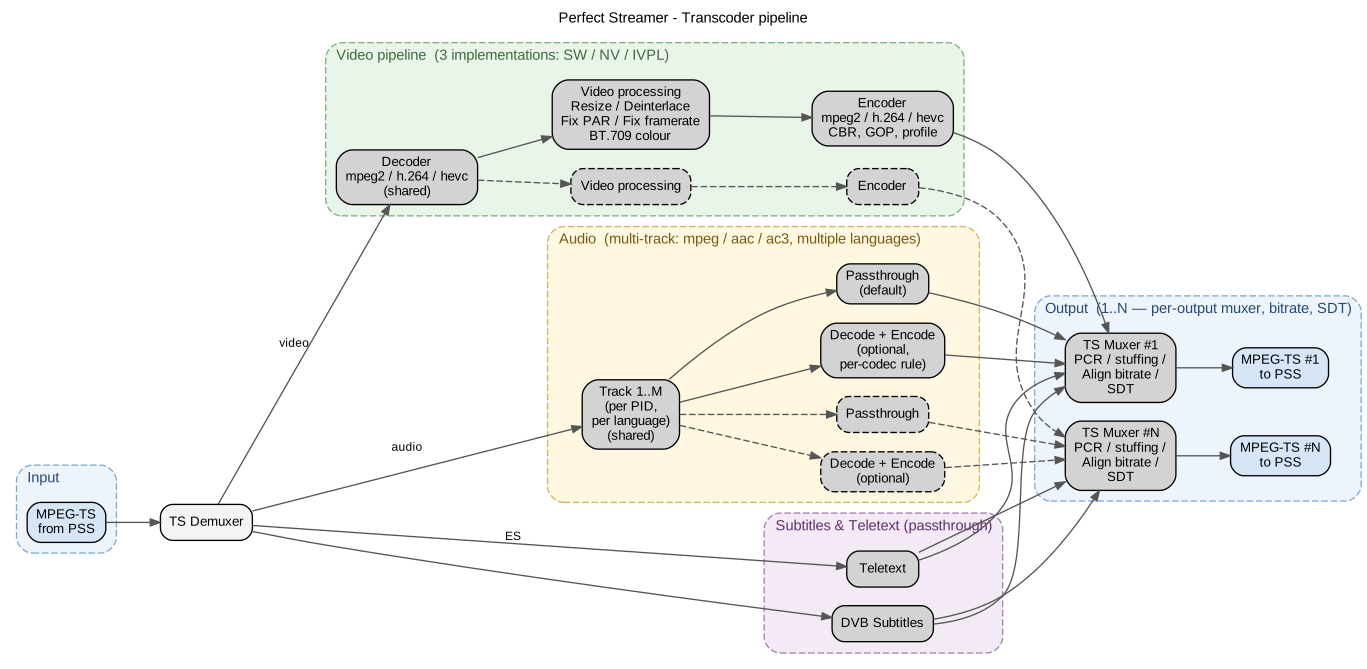
Transcoder architecture: a single shared decoder → N independent VPP + encoder branches (1-to-N); audio is multi-track with optional per-output transcoding; subtitles and teletext are passed through.¶
Codecs are implemented:
Video SW decoder: mpeg2, h.264, hevc (h.265)
Video NW decoder: mpeg2, h.264, hevc (h.265)
Video SW encoder: mpeg2, h.264, hevc (h.265)
Video NW encoder: h.264, hevc (h.265)
Interlaced stream is supported on input and output.
For H.264 and HEVC decoder, interlace alternate format (two separate fields in the stream) is supported. It is converted to interlace interleaved.
For HEVC decoder, Main10 profile with bt.709 (SDR) and bt.2020 (HDR) is supported. Encoder for HEVC always uses Main profile with bt.709.
For H.264 and HEVC decoder, VBR (Variable Frame Rate) format is supported. It is converted to constant frame rate.
Audio decoder — mpeg (layer 1,2,3), aac, ac3
Audio encoder — mpeg (layer 2), aac
Video Passthrough mode is mode without video transcoding, audio only is processed. SW transcoder is used.
Note
To configure transcoder instance, you need to configure two or more streams, with output (decoder) and input (encoder).
To configure transcoder instance:
Source — add stream output type transcoder (decoder). Select SW, NV or Video Passthrough type option.
Destination — add input type transcoder (encoder). Select corresponding decoder source in options.
Repeat this to configure several transcoder outputs for one decoder.
Transcoder output (decoder) options¶
Convert colors to BT.709 — conversion of SD BT.470-2 (PAL) and SMPTE 170M (NTSC) to BT.709
Trace — enable detailed transcoder log for diagnostics.
For correct transcoder operation, the source stream must meet certain requirements, and in some cases, this can be corrected. These settings do not convert the stream; they work as hints for correct transcoder operation.
There are settings to correct the input stream data:
Fix PAR — fix Pixel Aspect Ratio. Set as a fractional number in N/D format. For example, for Wide SD it is 16/9.
Fix Framerate — explicitly specify framerate. In some streams, the framerate in SPS may be missing, and the corresponding error will be in the transcoder log. In these cases, you need to explicitly specify the framerate. Set as a fractional number in N/D format.
Examples of framerate values:
PAL — 25/1
NTCS — 30/1 or 30000/1001
Cinema — 24/1 or 24000/1001
Transcoder input (encoder) options¶
Encoder Type — video codec.
Align Total Bitrate — stream stuffing bitrate (filling with null packets). It is important to set this if the stream will be used for DVB broadcasting. The bitrate must be guaranteed to be higher than the video bitrate and all audio tracks.
Video Profile — for H.264 you can select encoding profile.
Video Bitrate — video stream bitrate, kbps. Encoding always use CBR mode. Summary bitrate will be some higher due to audio tracks.
Speed Preset — encoding options preset, values 1 — 7. Less value — better quality and more resources consuming. Default: 4.
GOP Interval — GOP interval in frames (this parameter corresponds to Key Frame Interval). Default 25 (1 second for 25p), the recommended value if players start playback from an arbitrary point of the stream.
BFrame — select for better quality. Recommended value: 3.
Lookahead — configure for better quality. Recommended value is 20 — 50 frames.
Resize — picture resize.
Deinterlace — converts interlace to progressive.
Crop insert (empty padding around the picture) is not supported. Setting an arbitrary image size is not supported, as this may distort the proportions.
Resize options available:
Reduce the size by 2 and 4 times proportionally.
Make Wide SD 16:9 format with Aspect Ratio recalculation.
Upscale SD->HD. Applied for source format SD PAL/NTSC. Interlace is not supported, applied when deinterlacing is required.
Set the width. The height will be recalculated proportionally.
Set the height. The width will be recalculated proportionally.
Some parameters can be unsupported by selected transcoder. You can observe errors in transcoders logs.
Audio processing¶
By default, all audio tracks are transmitted from input to output without processing. Unnecessary tracks can be removed by configuring the PID filters in the stream.
If you need to transcode audio, you can set up the rules separately for each audio codec. The skip option is to remove the audio track with this codec.
If there are no audio tracks in the output stream, there will be an error, see the transcoder logs.
PCR and TR 101 290 formation.¶
MPEG-TS multiplexer generates a new PCR. If you correctly set Align Total Bitrate (more than the sum of video and audio bitrates), then PCR should pass the check according to the TR 101 290 standard.
Transcoders processing status¶
If there are problems with the transcoder (there is no output stream from the encoder), you need to look at the logs in the Transcoders section, a list of instances is displayed here (each line is a separate transcoder instance, decoder + N encoders) and, when you click on the desired instance, the logs status dialog opens. The current log and the log from the previous launch are displayed. For a detailed log, enable trace in the output (decoder) settings.
